Before and After Satellite Images: How to Make Them Free
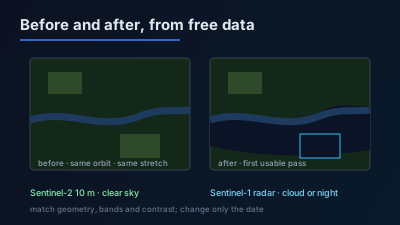
Quick Answer: To make a before-and-after satellite image of a reported event for free, take the last clear image before the event really happened (not when it was reported) and the first usable image after it, from the same sensor, on the same viewing geometry, with the same band combination and contrast. Use Sentinel-2 (10 m optical, 5-day revisit at the Equator) when the sky is clear and Sentinel-1 radar (6-day repeat with two satellites, day or night, through cloud) when it is not. At 10 m, floods, burn scars, large collapsed buildings and new earthworks show; individual vehicles, small craters and building-by-building damage do not. The sharp before-and-after pictures in news coverage come from commercial satellites at 30 to 50 cm.
A before-and-after satellite image is two pictures of the same place, one taken before an event and one after it, prepared so that the only visible difference is the event. Anyone can make one from free Sentinel-2 and Sentinel-1 data. The work is mostly in choosing the two dates, keeping the viewing geometry and the rendering identical, and being honest about what a 10 m pixel can show.
This guide covers floods, fires, strikes and earthquakes. Checking whether a reported event happened at all is a related but wider task, covered in how to verify a reported event with free satellite imagery. Here the focus is the image pair itself.
What makes a before-and-after satellite image honest?
An honest before-and-after pair changes one thing: time. Both images come from the same sensor, look at the ground from the same direction, use the same bands and the same contrast stretch, and are shown at the same scale over the same extent. Every other difference (season, sun angle, cloud shadow, radar look direction) is a difference that a viewer will read as the event.
The checklist is short:
| Keep the same | Why it matters |
|---|---|
| Sensor | Sentinel-2 and a commercial image differ in colour, sharpness and pixel size, so a change of sensor looks like change on the ground |
| Viewing geometry | For radar, ascending and descending passes light slopes and buildings from opposite sides |
| Band combination | True colour against false colour is not a comparison |
| Contrast stretch | A brighter stretch on one date makes everything look "changed" |
| Extent and scale | Cropping one image tighter hides or exaggerates the area affected |
| Season, where possible | Harvest, snow and dry-season burning change fields on a schedule |
If any row cannot be matched, say so in the caption. A caption that reads "Sentinel-2, 3 May and 8 May, natural colour, same stretch" lets someone else rebuild the same pair from the same free archive.
How do you choose the before and after dates?
Choose the "before" image as the last clear acquisition before the event actually happened, and the "after" image as the first usable acquisition once it was over or at its peak. The reported time is only an upper bound on when the event happened: articles are often published hours after the event, and in a different time zone from the place.
Work through three questions:
- When did it happen, not when was it reported? Use the earliest credible report as the latest possible event time. The "before" image must be older than that.
- What time of day do the satellites pass? Sentinel-2 crosses the Equator southbound at 10:30 mean local solar time, so a Sentinel-2 image is a late-morning view. Sentinel-1 flies a sun-synchronous orbit with its ascending node at 18:00 local time, so its passes fall near dawn and dusk. An event reported in the afternoon may already be on the next morning's radar pass, and a same-day Sentinel-2 image may be from before it.
- Which time zone is the image in? STAC catalogues, which most free imagery searches use, store acquisition time in UTC: the STAC item specification says the datetime "must be in UTC". Convert before deciding whether an image is before or after the event.
For floods, the "after" image should be as close to the peak as possible, because water recedes. UN-SPIDER lists "No capturing of flood peak due to the acquisition frequency of Sentinel-1" among the known limitations of free radar flood mapping in its recommended practice. For fires, an "after" image a few days later shows the burn scar better than one taken while smoke still covers the area.
How long will you wait for the after image?
The wait depends on each satellite's revisit and, for optical imagery, on cloud. Both are known in advance, so the earliest possible "after" date can be worked out before looking.
- Sentinel-2 is designed to give a revisit of 5 days at the Equator with two satellites (10 days for one), over a 290 km swath. Sentinel-2B and Sentinel-2C are the operational pair; Sentinel-2C replaced Sentinel-2A in operation on 21 January 2025. Cloud can turn a 5-day revisit into weeks without a usable image.
- Sentinel-1 has a 12-day repeat cycle for one satellite and a 6-day exact repeat cycle for the two-satellite constellation. ESA reports that Sentinel-1A's operational duties ended on 29 June 2026 and that Sentinel-1C and Sentinel-1D now work in tandem, 180° apart.
The 6-day figure is for an exact repeat, which is what a before-and-after pair needs: the same orbit track, the same geometry. Other tracks may cover the same place sooner but from a different angle. How the next pass over a given place is worked out from public orbit data is explained in when can a satellite next image this place?.
Both missions are free. Copernicus states that Sentinel data products are made available "systematically and free of charge to all data users", including the general public and commercial users.
Sentinel-2 vs Sentinel-1: which should you use for the pair?
Use Sentinel-2 when both dates have a clear sky, because optical change is easy to read and to explain to others. Use Sentinel-1 when cloud, smoke or darkness blocks one of the dates, or when speed matters more than legibility. Radar shows surface roughness and structure, not colour, so it takes more care to interpret.
| Sentinel-2 (optical) | Sentinel-1 (C-band radar) | |
|---|---|---|
| Pixel size | Four bands at 10 m, six at 20 m, three at 60 m | IW mode: 250 km swath at 5 m by 20 m (single look) |
| Needs daylight and clear sky | Yes | No: observes "at any time of the day or night" |
| Repeat on the same geometry | 5 days at the Equator (two satellites) | 6 days (two satellites) |
| Flood | Water visible in natural colour and near-infrared if clear | Smooth open water turns dark where land was brighter |
| Fire | Burn scar, clearest in infrared combinations | Weak; vegetation loss changes the return, but not as clearly |
| Collapsed buildings | Changed roof shape, debris, if the building is many pixels | Changed return from walls and roofs; depends on look direction |
| Earthquake | Landslides, large collapses, surface ruptures | Landslides and large collapses; ground movement needs interferometry, a different method |
How does change look in Sentinel-1 radar?
Radar change looks like a change in brightness. Calm open water reflects the radar pulse away from the satellite and appears dark, which is why flooded fields stand out against drier land; UN-SPIDER notes that "the precondition for SAR water detection is a smooth water surface", so wind-roughened water can be missed. Buildings return strongly because walls and the ground form corners; NASA describes how "double bounce scattering is caused by buildings, tree trunks, or inundated vegetation". A destroyed block loses part of that corner return.
The same NASA page warns that "areas of layover and shadow may occur in SAR imagery" depending on terrain and look angle. Layover and shadow fall on opposite sides of a slope on ascending and descending passes, which is why a radar pair must use the same orbit direction. UN-SPIDER lists "False positives caused by differences in relative orbits" among the limits of Sentinel-1 flood mapping. The geometry is shown in ascending vs descending SAR orbits.
In STAC metadata the two fields to match are sat:orbit_state ("Either ascending or descending for polar orbiting satellites", per the STAC sat extension) and sat:relative_orbit ("The relative orbit number at the start of acquisition"). Same orbit state and same relative orbit means the same track and the same look direction.
What can a 10 m before-and-after image show, and what can it not?
A 10 m pair shows change that covers several pixels: a flooded floodplain, a burn scar, a cleared or bulldozed block, a large collapsed warehouse, a new berm, a landslide. It does not show a single damaged house reliably, a vehicle, a small crater, or the difference between a damaged and an intact roof of ordinary size. The limit is the pixel, and no amount of zooming removes it.
A 10 m pixel covers 100 m² of ground. A 30 cm pixel covers 0.09 m², so one Sentinel-2 pixel holds about 1,100 pixels of a 30 cm image. That ratio is why building-by-building damage assessments are made with very high-resolution imagery. The UNOSAT comprehensive damage assessment of the Gaza Strip published on 31 May 2024 lists its imagery on the map sheet: WorldView-3 at 30 cm, WorldView-2 at 50 cm and Pléiades Neo at 30 cm, compared against nine earlier dates. Even at that resolution, the same sheet states: "This is a preliminary analysis and has not yet been validated in the field."
Before making a pair, estimate the size of the claimed change on the ground and divide by 10 m. If the answer is under a few pixels, the honest caption is "not observable at 10 m", and the free pair should not be published as evidence either way. Target-by-target examples are in what you can actually see in 10 m satellite imagery.
How do you make the two images match on screen?
Render both dates with the same settings and the same frame, then check that the remaining difference is at the reported place. A pair built this way can be repeated by anyone with the same scene IDs.
- Find both scenes over the same area. Search a date range around the event. For Sentinel-2, sort or filter by cloud cover and inspect the area of interest itself, not only the scene-wide percentage: a scene that is 40% cloudy can be clear over the site.
- Check geometry. For Sentinel-1, keep the orbit direction and relative orbit the same. For Sentinel-2, a pair from the same relative orbit keeps the viewing angle consistent.
- Pick one band combination for both. Natural colour is easiest to explain. A short-wave infrared combination separates burn scars from shadow; false color composites explains why. For radar, use the same polarisation (VV or VH) on both dates.
- Use one contrast stretch for both. Automatic per-image stretching adapts to each scene's brightest pixels, so smoke, snow or new bare soil in one image changes how everything else looks. Fix the range.
- Frame them identically. Same centre, same zoom, same crop. Put the dates and sensor on each panel.
- Add a third date. An image from a few weeks earlier shows whether the "change" was already there.
Cloud shadow deserves a separate look in optical pairs. A dark patch that appears only in the "after" image may be a shadow; look for its cloud nearby. Methods for masking cloud are covered in Sentinel-2 cloud masking techniques.
Where do the high-resolution before-and-after images in the news come from?
The sharp before-and-after pictures that accompany news coverage of strikes and disasters, including searches such as "Gaza satellite imagery before and after" or "Iran satellite imagery before and after", are taken by commercial satellites and licensed to the publisher. The credit line under the image names the operator. Free Sentinel imagery cannot reproduce them; it can show the same event at 10 m.
Two operators whose own pages describe this work:
- Vantor, the company formerly called Maxar Intelligence (renamed in October 2025). Its News Bureau program "partners with trusted and respected media organizations", and its Open Data Program releases before and after imagery of qualifying sudden-onset disasters under a Creative Commons BY-NC 4.0 licence.
- Planet, whose tasking page lists SkySat at 50 cm with sub-daily tasking and Pelican as "30 - 50 cm class high-resolution imagery", sold as paid tasking.
When one of these images is published, it shows what the operator and the publisher chose to release. The scene may have been tasked, cropped and processed for that story. A free Sentinel pair of the same place is a useful independent check on the extent of what changed, but not on detail finer than 10 m.
What are the honest limits of a free before-and-after pair?
A free pair shows that something large enough to cover several 10 m pixels changed at a place between two dates. It does not show who caused the change, what weapon or process caused it, how many people were affected, or damage smaller than the pixel. Write the caption so that it claims no more than that.
Three limits recur:
- Timing. The pair brackets the event between two acquisitions, which may be days apart. It does not date the event more precisely than that.
- Absence. No visible change means nothing large enough changed at that place between those dates. It is not proof that nothing happened.
- Confounders. Season, tide, harvest, cloud shadow and radar geometry all produce change. UN-SPIDER lists "False positives from changes on the land surface, not caused by flooding" for exactly this reason.
Consider a hypothetical scenario: a report says a fuel depot of 300 m by 200 m burned overnight. That is 30 by 20 Sentinel-2 pixels, large enough to show a burn scar. The before image is the last clear Sentinel-2 scene before the earliest report, converted to local time; the after image is the first clear scene a few days later, once smoke has cleared, in the same infrared combination and stretch. If both are cloudy, the fallback is a Sentinel-1 pair on the same relative orbit, which will show changed structure rather than a burn scar. The caption names both dates, the sensor and the combination, and says what the pair cannot show: the cause.
How can you do this in Off-Nadir Delta?
Off-Nadir Delta puts the free archives on one map, so a pair can be built without downloading scenes. The workspace searches Sentinel-2 and Sentinel-1 over an area of the map and a chosen date range, lists each scene's cloud cover for Sentinel-2, filters Sentinel-1 by orbit direction, and adds each chosen date to the map as its own layer. There is no side-by-side slider; the two dates are two layers you switch between.
- The Sentinel-2 viewer shows recent passes at 30 m on the page with no login; 10 m true colour, false colour and NDVI are on the free plan with a free account.
- The Sentinel-1 SAR viewer covers radar in VV or VH for cloudy or night-time cases; Sentinel-1 is on the free plan, metered against the account's token balance.
- Satellite pass prediction works out when a place can next be imaged and on which geometry, which gives the earliest possible "after" date.
For the terms used here (revisit, relative orbit, backscatter), see the glossary.

Remote sensing specialist with 10+ years in satellite data processing and AI. Founder of Off-Nadir Lab. Ph.D. in Informatics (Yokohama National University, 2026). Master's in Earth System Science and Technology (Kyushu University). Co-author, Remote Sensing Encyclopedia. More about the author →