
Ascending vs Descending Orbits in SAR: Why It Matters More Than You Think
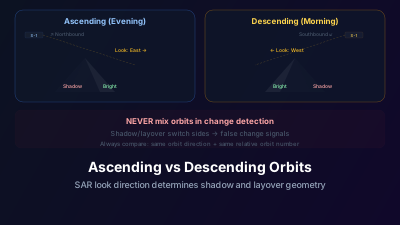
Quick Answer: SAR satellites view the ground from different angles on ascending (northbound, typically evening) and descending (southbound, typically morning) passes. The radar look direction flips between orbits, causing buildings, slopes, and terrain features to cast shadows and produce layover on opposite sides. Mixing ascending and descending data in change detection creates geometric artifacts that mimic real changes. Always compare same-orbit-direction data. Use both orbits together only for 3D deformation decomposition or to increase temporal sampling when geometric effects are accounted for.
Comparing two Sentinel-1 acquisitions over mountainous terrain can produce a dramatic backscatter change confined to a single hillside — the kind of signature that looks like a fresh landslide. If one acquisition came from an ascending pass and the other from a descending pass, no ground change is required to produce it: radar shadow and layover simply fall on the opposite side of the slope once the look direction flips.
The implication is general: in SAR analysis, orbit direction isn't a minor metadata field — it's fundamental.
How SAR Geometry Changes Between Passes
SAR satellites in sun-synchronous orbits make two types of passes over any given latitude:
Ascending pass: The satellite travels roughly south-to-north (ascending in latitude). For Sentinel-1, this typically occurs in the evening local time. The radar looks to the right of the flight direction — in this case, roughly eastward.
Descending pass: The satellite travels north-to-south. This typically occurs in the morning. The radar looks to the right — roughly westward.
The critical difference: the look direction flips by approximately 180°. A slope facing east is illuminated head-on during ascending passes but faces away from the radar during descending passes. The resulting backscatter difference can be enormous — 10 dB or more in mountainous terrain.
What Changes Between Orbits
Layover and Foreshortening
Radar signals travel at an angle to the ground. Tall features like mountains and buildings are "seen" from the side, not from above. This creates geometric distortions:
Foreshortening: Slopes facing the radar appear compressed. A 30° slope illuminated from the front gets squeezed into fewer pixels than it actually occupies on the ground.
Layover: Extreme foreshortening where the top of a feature is mapped closer to the radar than its base. The mountain top appears to "lay over" onto the valley in front of it. This effect reverses completely between ascending and descending orbits.
Radar shadow: Slopes facing away from the radar at steep angles receive no illumination and return no signal — they appear black. The shadow falls on opposite sides of terrain features in ascending vs. descending data.
Building Appearance
Urban buildings are affected similarly. A row of buildings along a north-south street will show:
- Ascending: Bright returns from east-facing walls, shadow on the west side
- Descending: Bright returns from west-facing walls, shadow on the east side
The overall brightness of the urban area may be similar, but the spatial pattern of bright and dark pixels is completely different. This makes pixel-level comparison between orbits unreliable.
Incidence Angle Differences
Even flat terrain is affected. The local incidence angle (the angle between the radar beam and the surface normal) differs between ascending and descending passes because the satellite approaches from different azimuths. This produces systematic backscatter differences for any non-flat surface.
The Practical Rules
Rule 1: Same Orbit for Change Detection
This is the most important rule in SAR time-series analysis. When comparing two dates to detect change:
- Always use the same orbit direction (both ascending or both descending)
- Ideally use the same relative orbit number (Sentinel-1 has 175 relative orbits in each direction)
- Same orbit means same viewing geometry, so backscatter differences represent actual surface changes
Rule 2: Same Orbit for InSAR
Interferometry requires near-identical viewing geometry. Interferograms are computed from same-orbit-direction pairs with small perpendicular baselines. Cross-orbit interferograms are physically meaningless.
Rule 3: Both Orbits for Deformation Decomposition
InSAR measures displacement in the satellite's line-of-sight direction, which differs between ascending and descending. By combining deformation measurements from both orbit directions, you can decompose the signal into vertical and east-west components — providing quasi-3D deformation information.
Rule 4: Both Orbits for Improved Temporal Sampling
If you need more frequent observations and can account for geometric differences (through normalization or by analyzing trends rather than absolute values), combining both orbit directions effectively doubles your temporal sampling. Sentinel-1 ascending and descending passes over the same area are typically offset by 3-6 days.
Sentinel-1 Orbit Configuration
Sentinel-1 repeats its exact orbital track every 12 days (one satellite) or 6 days (two satellites). Each track is identified by a relative orbit number (1-175).
For any given area, the data is typically available from:
- 1-2 ascending relative orbits
- 1-2 descending relative orbits
The overlap between adjacent tracks means some areas are covered by multiple orbits in the same direction, with acquisitions offset by a few days. This is particularly true at higher latitudes where orbital tracks converge.
To check which orbits cover your area of interest:
- Search for available data over your area
- Note the orbit direction and relative orbit number of each acquisition
- Group by orbit direction and relative orbit number
- Work within consistent groups for time-series analysis
Choosing the Better Orbit
When both ascending and descending data are available, which should you use? Consider:
Terrain orientation: If your study area has predominantly east-facing slopes, descending (westward-looking) data will have less shadow but more foreshortening. Ascending (eastward-looking) data will illuminate these slopes head-on. Choose based on which distortion is more tolerable.
Shadow avoidance: Radar shadow is pure data loss — no information is recovered. Choose the orbit that minimizes shadow over your area of interest.
Temporal sampling: If one orbit direction provides more frequent coverage (due to overlapping tracks), it may be preferred despite suboptimal geometry.
Existing time series: If a long time series already exists in one orbit direction, continuing with the same direction maintains consistency.
A Common Mistake and Its Cost
The orbit-mixing mistake is more common than you'd think, partly because data catalogs sort by date, not by orbit. An analyst searching for "all Sentinel-1 data over Area X in January 2025" gets a mix of ascending and descending acquisitions. Computing NDVI-like backscatter changes between consecutive dates (which alternate between orbit directions) produces spurious signals that correlate with terrain more than with actual surface change.
"Deforestation" detected on steep slopes can be entirely an artifact of comparing acquisitions from different orbit directions. The forest is unchanged; only the radar geometry differs.
The fix is simple: filter your data by orbit direction before any analysis. It adds one step to your workflow and prevents an entire category of errors.
Orbit Geometry Effects: Which Surfaces Are Most Affected
The size of the orbit-direction effect scales with how much vertical structure a surface has and how strongly that structure is oriented. Ranking surfaces by sensitivity helps you judge when mixing orbits is merely imprecise and when it is disqualifying:
| Surface Type / Feature | Sensitivity to Orbit Direction | Change Detection Impact | Workaround |
|---|---|---|---|
| Flat water body | Negligible | Negligible | Can mix |
| Flat agricultural field | Very low | Minimal; acceptable for some analyses | Use same orbit for precision |
| Desert / bare rock | Low | Low | Acceptable if aware of a systematic offset |
| Forest (dense, tropical) | Low to moderate | Moderate; forest is low-coherence anyway | Usually acceptable for amplitude monitoring |
| Urban area (general) | High | Significant; spatial patterns differ even if scene totals are similar | Same orbit essential |
| East- or west-facing slope | High | Severe; foreshortening on one pass, shadow on the other, with the sign reversed between orbits | Same orbit; avoid if steep |
| Building walls (N–S oriented) | Very high | Severe; bright from one orbit, in shadow from the other | Same orbit only |
The exact magnitude in decibels depends on the slope angle, the wall orientation relative to the flight track, and the local incidence angle, so it has to be measured for your own area rather than read from a table.
The temporal offset between ascending and descending passes: Sentinel-1 flies a dawn/dusk sun-synchronous orbit, so ascending and descending passes over the same place are separated by roughly twelve hours of local solar time — evening versus morning — and typically by a few days in calendar time. If you want to use both orbit directions in a combined time series (doubling temporal sampling), you must either: (1) treat them as separate channels with their own baselines, or (2) apply a geometric normalization that removes the systematic mean backscatter difference between orbits. Without normalization, the alternating orbit direction creates an artificial periodic signal in the time series that can be mistaken for real seasonal variation.
Practical Sentinel-1 orbit data: Globally, Sentinel-1 collects in ascending and descending direction for most land areas. Across the 250 km Interferometric Wide (IW) swath the local incidence angle runs from roughly 29° at the near-range edge to about 46° at the far-range edge. This incidence angle variation within a single pass is much smaller than the ascending–descending geometry flip (which changes the direction of illumination by ~180°), but it still produces systematic east-west gradients in backscatter within a single scene that users of map-projected data should be aware of.
When Geometry Differences Are the Signal
There's one scenario where comparing ascending and descending data is useful: characterizing 3D structure. Buildings, bridges, and tall vegetation respond differently to eastward vs. westward illumination. These differences carry information about structure orientation, height, and geometry.
Researchers have used ascending-descending comparisons to:
- Estimate building heights in urban areas
- Map forest canopy structure
- Characterize slope-dependent surface roughness
In these applications, the geometric difference between orbits isn't noise — it's the signal. But you need to know you're measuring geometry, not surface change.
The orbit direction is metadata that's always available but rarely gets the attention it deserves. Treating it as a first-class parameter in your analysis workflow prevents the most common SAR analysis mistake and opens the door to more sophisticated multi-geometry analyses.
Related reading
The geometry flip described here has a quantitative form: the share of an area lost to layover and shadow changes with look direction and incidence, and can be computed from a terrain model before the pass. How much of a SAR scene is actually usable works through that calculation, and satellite pass prediction covers choosing which pass to wait for.

Remote sensing specialist with 10+ years in satellite data processing and AI. Founder of Off-Nadir Lab. Ph.D. in Informatics (Yokohama National University, 2026). Master's in Earth System Science and Technology (Kyushu University). Co-author, Remote Sensing Encyclopedia. More about the author →