
False Color Composite (False Colour): How to Read It
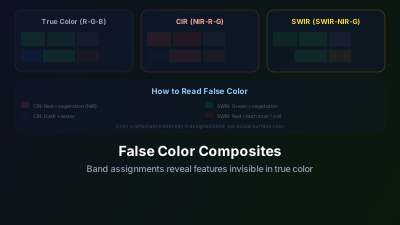
Quick Answer: False color composites assign non-visible spectral bands to the red, green, and blue display channels, revealing information invisible in natural color. Color Infrared (NIR-Red-Green) makes vegetation appear bright red; SWIR composites (SWIR-NIR-Green) highlight moisture differences and burn scars; Urban composites (SWIR-SWIR-Red) separate built-up areas from vegetation. Learning to read false colors is one of the most practical skills in satellite image analysis.
A standard Color Infrared composite is usually the first satellite image that prompts a newcomer to ask why everything is red. Vegetation renders in vivid red, water in dark blue-black, and urban areas in gray. Nothing in the scene has actually changed color — what has changed is the mapping from spectral bands to display channels, and that mapping is chosen for how much it reveals, not for how familiar it looks.
False color composites are one of those things that seem confusing at first but become second nature once you understand the logic.
Why We Use False Color
Your computer monitor has three color channels: Red, Green, Blue (RGB). A satellite like Sentinel-2 has 13 spectral bands. To display any satellite image, you have to choose which three bands to assign to the R, G, and B channels.
True color assigns Red band → R, Green band → G, Blue band → B. The result looks like a photograph. It's intuitive but wastes 10 of Sentinel-2's 13 bands.
False color assigns other bands to the display channels, making invisible information visible. Near-infrared light, shortwave infrared, red edge — all invisible to human eyes — suddenly become something you can see and interpret.
The key insight: in a false color composite, the color you see doesn't represent the actual color of the surface. It represents the reflectance intensity in whatever band you assigned to that channel.
The Most Useful Composites
Color Infrared (CIR): NIR – Red – Green
This is the classic false color combination, used since the film era. Assign:
- Red channel ← NIR (Band 8)
- Green channel ← Red (Band 4)
- Blue channel ← Green (Band 3)
How to read it:
- Bright red/magenta: Healthy, dense vegetation. Plants strongly reflect NIR light, which is displayed as red.
- Pink/light red: Less dense vegetation, grassland, or stressed crops.
- Dark blue/black: Water. Water absorbs NIR, so the red channel goes dark.
- Gray/cyan: Urban areas, bare soil, rock. These reflect moderately across all displayed bands.
- White: Clouds, snow, or very bright bare surfaces.
CIR is the workhorse composite for agriculture and vegetation analysis. The contrast between healthy vegetation (red) and stressed vegetation (pink/gray) is immediately apparent — often more obvious than in true color, where both might look "green."
You can check this on real data: the Sentinel-2 viewer displays a scene in true color or in false color, so the same fields can be compared in both.
SWIR Composite: SWIR1 – NIR – Green
Assign:
- Red channel ← SWIR1 (Band 11, 1610 nm)
- Green channel ← NIR (Band 8)
- Blue channel ← Green (Band 3)
How to read it:
- Bright green: Vegetation (high NIR reflectance in the green channel)
- Brown/orange: Bare soil, dry vegetation (moderate SWIR, low NIR)
- Magenta/red: Urban areas, bare rock (high SWIR, low vegetation)
- Dark blue/black: Water
- Bright red/orange patches: Recent burn scars (high SWIR, reduced NIR)
This composite is excellent for discriminating between vegetated and non-vegetated surfaces, identifying burn scars, and mapping soil moisture (wet areas appear darker than dry areas in the SWIR channel).
Urban / Geology: SWIR2 – SWIR1 – Red
Assign:
- Red channel ← SWIR2 (Band 12, 2190 nm)
- Green channel ← SWIR1 (Band 11, 1610 nm)
- Blue channel ← Red (Band 4)
How to read it:
- Cyan/blue: Vegetation
- White/gray: Urban areas, concrete, built surfaces
- Brown/tan: Bare soil
- Dark: Water
- Distinct color patches: Different mineral compositions in bare soil/rock
Geologists favor this composite because different minerals have distinctive SWIR absorption features. Iron oxides, clays, and carbonates each appear in subtly different tones, enabling mineral mapping from orbit.
Agriculture: Red Edge – NIR – Red
Assign:
- Red channel ← Red Edge (Band 5 or 6)
- Green channel ← NIR (Band 8)
- Blue channel ← Red (Band 4)
This Sentinel-2-specific composite exploits the red edge bands. The resulting image emphasizes subtle differences in vegetation health that standard CIR composites miss. Crop fields at different growth stages, nitrogen deficiency zones, and species transitions become more visible.
Reading Tips
Color = Band Intensity
When you see a bright red pixel in a CIR composite, your brain wants to think "red object." Train yourself to think instead: "high NIR reflectance." The pixel is bright in whatever band is assigned to the red channel.
Black = Low Reflectance
If a pixel appears black, it means low reflectance in all three displayed bands. Water appears black in CIR because it absorbs NIR (red channel), red light (green channel), and green light (blue channel).
White = High in Everything
Clouds appear white in most composites because they reflect strongly across nearly all wavelengths. Snow is similar in visible-only composites but appears differently in SWIR composites (snow absorbs SWIR, so it appears dark in the SWIR channel — useful for cloud/snow discrimination).
Compare, Don't Memorize
Rather than memorizing what every color means in every composite, focus on contrast. The value of false color is in the contrast it creates between different surface types. If two fields look identical in true color but different in SWIR composite, that difference is real — it's just invisible to your eyes.
Creating Custom Composites
The "right" composite depends on your question:
| Question | Suggested Bands (R-G-B) | Why |
|---|---|---|
| Vegetation health? | NIR – Red – Green | Vegetation reflects NIR strongly |
| Burn scar? | SWIR – NIR – Green | Burns have high SWIR, low NIR |
| Water bodies? | NIR – SWIR – Red | Water absorbs both NIR and SWIR |
| Urban extent? | SWIR – NIR – Red | Built areas have distinct SWIR signature |
| Snow vs. cloud? | SWIR – NIR – Green | Snow absorbs SWIR; clouds don't |
| Geology? | SWIR2 – SWIR1 – Red | Mineral-specific absorption features |
Quick Color Reference: What Different Surfaces Look Like
This table summarizes what key surface types appear as in each major composite — a practical reference when you're first learning to read unfamiliar band combinations:
| Surface Type | True Color | Color Infrared (NIR-R-G) | SWIR Composite (SWIR-NIR-G) | Urban/Geology (SWIR2-SWIR1-R) |
|---|---|---|---|---|
| Dense green forest | Dark green | Bright red | Bright green | Cyan |
| Stressed/sparse vegetation | Light green | Pink / pale red | Lime green | Pale cyan |
| Bare dry soil | Tan / brown | Tan / gray | Brown / orange | Brown |
| Wet soil | Dark brown | Dark gray | Dark brown (darker than dry) | Dark |
| Urban (concrete) | Gray | Light gray | Magenta / light purple | White / gray |
| Deep clear water | Dark blue | Dark blue-black | Dark blue-black | Dark blue |
| Turbid/sediment-loaded water | Light brown | Light gray-brown | Dark brown | Dark |
| Fresh burn scar | Black / dark gray | Dark / brown | Bright orange-red | Brown-orange |
| Active fire | White saturation | White saturation | Saturated SWIR (bright red) | Bright red |
| Cloud | White | White | White | White |
| Snow | White | White | Dark in R channel (SWIR absorbed) | Dark red |
The snow/cloud discrimination row is particularly important. In true color, snow and cloud look identical. In the SWIR composite, snow appears dark in the SWIR channel because water ice absorbs shortwave infrared — clouds do not. This makes the SWIR composite the standard tool for cloud/snow masking.
The Stretch Matters
Even with the right band combination, a poorly stretched composite is useless. "Stretching" maps the range of pixel values to the 0–255 display range.
Linear stretch: Maps the minimum and maximum values linearly. Simple but can be dominated by outliers (one very bright cloud pixel stretches the entire range).
Percentage clip stretch: Ignores the top and bottom 2% of values. Much better for most scenes.
Standard deviation stretch: Centers on the mean and stretches by N standard deviations. Good for enhancing contrast in scenes with a narrow value range.
Always check the stretch when sharing images. The same data with different stretches can tell very different visual stories.
A Practical Skill
False color interpretation is arguably the most practical visual skill in remote sensing. It lets you quickly assess large areas, identify anomalies, and communicate findings visually. CIR composites can reveal irrigation failures that are not visible in true color, SWIR composites can locate active burn scars under smoke, and geology composites can bring out alteration zones in mineral exploration.
The colors aren't real, but the information they convey is. Once you learn to read them, true color images start to feel like you're missing half the picture — because you are.
Frequently asked questions
What is a false color composite?
A false color composite assigns non-visible spectral bands to the red, green, and blue display channels. Because the display no longer maps to what the eye would see, surface properties that are invisible in natural color — vegetation vigor, moisture, burn scars — become clearly separable.
Why does vegetation appear bright red in color infrared?
Color Infrared (CIR) maps near-infrared to the red channel, red to green, and green to blue. Healthy vegetation reflects near-infrared very strongly, so it dominates the red channel and appears vivid red. The brighter and redder the tone, generally the more vigorous the vegetation.
Which composite highlights moisture and burn scars?
A SWIR composite (SWIR-NIR-Green) is the usual choice. Shortwave infrared is sensitive to water content, so it separates wet from dry surfaces and makes recent burn scars stand out from surrounding unburned land.
How do I separate built-up areas from vegetation?
An urban/geology composite (SWIR2-SWIR1-Red) contrasts built-up surfaces against vegetation and soil, because concrete, vegetation, and bare ground have very different shortwave-infrared responses. It is a fast way to delineate settlement extent.
What do black and white tones mean in a false color image?
Color always reflects band intensity. A surface appears black when it reflects little in all three assigned bands (for example, calm water in most composites) and white when it reflects strongly in all three. Reading tone band-by-band, rather than memorizing colors, is the key skill.

Remote sensing specialist with 10+ years in satellite data processing and AI. Founder of Off-Nadir Lab. Ph.D. in Informatics (Yokohama National University, 2026). Master's in Earth System Science and Technology (Kyushu University). Co-author, Remote Sensing Encyclopedia. More about the author →