
Reference Layers: Adding Geographic Context to Satellite Imagery
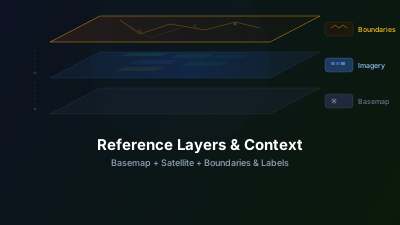
Quick Answer: Reference layers — basemaps, administrative boundaries, road networks, and thematic overlays — transform raw satellite imagery into actionable information. Without geographic context, a bright spot in SAR could be a building, a ship, or a rock outcrop. With reference layers, you can immediately identify what you're looking at. Off-Nadir Delta provides multiple basemap options and reference datasets that overlay with satellite imagery.
Why does geographic context matter?
Satellite imagery only becomes information when you know what you are looking at, and reference layers supply that knowledge. Open a SAR image of an unfamiliar area and you'll see bright and dark patterns — but what are they? NASA Earthdata defines SAR as "a type of active data collection where an instrument sends out a pulse of energy and then records the amount of that energy reflected back after it interacts with Earth" — the sensor records physical structure, not labels. Without geographic context, interpreting those patterns is largely guesswork.
Now add a basemap showing roads, cities, and coastlines. Suddenly:
- That bright linear feature is a highway
- The dark region is a lake
- The cluster of bright points is a port city
- The isolated bright dot offshore is a vessel
Reference layers turn pattern recognition into geographic understanding.
Types of Reference Layers
Basemaps
Basemaps provide the foundational geographic context — land/water boundaries, terrain, place names, and road networks. Common options:
| Basemap Type | Best For |
|---|---|
| Street map | Urban analysis, infrastructure planning |
| Satellite mosaic | General orientation, natural features |
| Terrain/Topographic | Mountainous areas, geological analysis |
| Dark/Minimal | Highlighting satellite data overlay without visual clutter |
For satellite imagery analysis, a dark minimal basemap is often best — it provides geographic reference without competing visually with your data layers.
Administrative Boundaries
Country, state/province, and municipality boundaries help localize observations:
- "The flood affects three districts in Bangladesh"
- "Deforestation is concentrated in this municipality"
- "Urban expansion is crossing the city boundary"
Infrastructure
Roads, railways, airports, and ports help interpret both optical and SAR imagery:
- Linear bright features in SAR often follow road networks
- New construction typically appears along existing infrastructure corridors
- Port facilities explain clusters of ship detections
Thematic Overlays
Specialized reference data adds domain-specific context:
- Protected areas — Is the detected deforestation inside a national park?
- Flood zones — Does the SAR-detected flooding match historical flood risk areas?
- Agricultural parcels — Which farmer's field shows stress in the NDVI analysis?
- Submarine cables — Understanding critical infrastructure in maritime monitoring
How do you manage the layer stack?
Keep the basemap at the bottom, satellite imagery in the middle, and vector overlays on top, then use opacity — not layer count — to control what draws attention. Most interpretation sessions need no more than three or four active layers at once; everything else should stay toggled off until a specific question calls for it.
The Layer Stack
When combining reference layers with satellite data, layer order matters:
- Basemap (bottom) — Geographic reference
- Satellite imagery (middle) — Your analysis data
- Vector overlays (top) — Boundaries, labels, points of interest
This stacking ensures satellite data is visible against the basemap, with vector features drawn on top for identification.
Opacity Control
The most important tool for multi-layer analysis is opacity adjustment:
- Satellite layer at 100% opacity: Hides the basemap — useful when the satellite data is self-explanatory
- Satellite layer at 50-70% opacity: Shows satellite data with basemap visible underneath — best for orientation
- Satellite layer toggled on/off: Quick comparison between satellite view and basemap reference
Avoiding Visual Clutter
More layers isn't always better. Each additional layer competes for visual attention. Best practices:
- Start with minimal basemap + your primary satellite layer
- Add reference layers one at a time as needed
- Turn off layers you're not actively using
- Use subtle styling (thin lines, low opacity) for reference layers so they don't overpower the satellite data
Practical Workflows
Flood Response
- Load dark basemap for orientation
- Add Sentinel-1 SAR flood image
- Overlay administrative boundaries to identify affected districts
- Add road network to assess transportation access
- Toggle between pre-flood and post-flood SAR to confirm flood extent
The full analysis side of this workflow is covered in the SAR flood mapping guide.
Agricultural Monitoring
- Load street/parcel basemap
- Add Sentinel-2 NDVI visualization
- Overlay field boundaries to match NDVI values to specific parcels
- Compare against previous season's NDVI with the same reference layers
Maritime Monitoring
- Load nautical/ocean basemap
- Add Sentinel-1 SAR for ship detection
- Overlay shipping lanes and port boundaries
- Add Exclusive Economic Zone (EEZ) boundaries for jurisdictional context
Urban Analysis
- Load satellite mosaic basemap
- Add NDBI visualization from Sentinel-2
- Overlay city boundaries and zoning maps
- Compare with nighttime lights to cross-validate urban extent
Key Free Reference Datasets
These openly available datasets are useful overlays for satellite imagery interpretation:
| Dataset | Provider | Coverage | Best For |
|---|---|---|---|
| OpenStreetMap (OSM) | OpenStreetMap contributors | Global | Roads, buildings, POIs, coastlines |
| GADM Administrative Boundaries | GADM | Global | Country, province, municipality boundaries |
| Global Surface Water (JRC) | JRC / Google | Global (1984–present) | Permanent/seasonal water body mapping |
| WDPA Protected Areas | IUCN / UNEP-WCMC | Global | Conservation status, national park boundaries |
| GlobCover / ESA WorldCover | ESA | Global | Land cover classification reference |
| OpenSeaMap | OpenSeaMap | Global (maritime) | Shipping lanes, ports, hazards |
| Natural Earth | Natural Earth | Global | Low-detail boundaries for regional overview |
| UN OCHA administrative data | UN HDX | Conflict-affected regions | Humanitarian response coordination |
Most of these datasets are available as GeoJSON or shapefile downloads that can be loaded via the Data Loader for overlay with your satellite imagery. The Copernicus programme's own reference and satellite collections are freely accessible through the Copernicus Data Space Ecosystem, and a broader survey of what's available at no cost is in free satellite data sources explained. For the satellite layers themselves, see the data sources overview.
What data quality issues should you check?
Before trusting any overlay, check three things: when the reference data was made (temporal alignment), how precisely it is georeferenced (positional accuracy), and whether its level of detail suits your analysis scale. A boundary file that is five years old or misaligned by a few pixels can silently flip a conclusion — inside the protected area versus outside it.
Temporal Alignment
Reference data has its own timestamp. Road networks change, cities expand, boundaries are redrawn. Using a 2015 road map to interpret 2026 satellite imagery may show "new construction" that is actually decade-old development.
Positional Accuracy
Not all reference datasets are precisely georeferenced. A few pixels of misalignment between your satellite data and a boundary overlay can lead to incorrect assignments — is this deforestation inside or outside the protected area?
Scale Appropriateness
Reference data designed for national-level mapping may lack the detail needed for local analysis. Conversely, highly detailed local data may be too cluttered at regional scales.
Reference Layers in Off-Nadir Delta
Off-Nadir Delta provides reference layers that can be combined with any satellite data source:
- Open the Reference Layers panel from the sidebar
- Browse available basemaps and thematic layers
- Toggle layers on/off and adjust opacity
- Reorder layers using the layer manager
- Combine with Sentinel-1, Sentinel-2, or your own data for comprehensive analysis
The ability to instantly switch between different reference contexts — without downloading data or switching tools — makes geographic interpretation significantly faster and more reliable. The same layers also add context to long-running observation: if you track an area over months, see how to monitor any area with satellite time series.

Remote sensing specialist with 10+ years in satellite data processing and AI. Founder of Off-Nadir Lab. Ph.D. in Informatics (Yokohama National University, 2026). Master's in Earth System Science and Technology (Kyushu University). Co-author, Remote Sensing Encyclopedia. More about the author →