
How to Monitor Any Area with Satellite Time Series: A Complete Guide
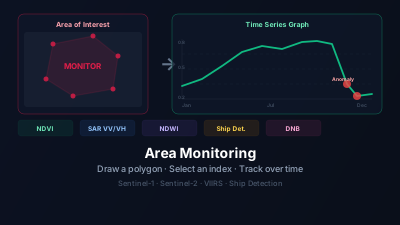
Quick Answer: Satellite area monitoring works by repeatedly analyzing the same region using indices like NDVI, SAR backscatter, or nighttime light. You draw a polygon over your area of interest, select which index to track, and set a start date. The system collects all available scenes and plots them as a time series graph. Sudden drops or spikes — called anomalies — indicate change events such as deforestation, flooding, or crop harvest.
What Is Satellite Area Monitoring?
Satellite area monitoring is the practice of repeatedly measuring the same geographic region using satellite data and plotting the results over time. Rather than analyzing a single snapshot, you build a time series — a sequence of measurements spaced days or weeks apart — that reveals how a location is changing.
This technique is fundamental to modern environmental science, agriculture, disaster response, and infrastructure surveillance. The same method that scientists use to track Amazon deforestation is now accessible to anyone with a browser. For a concise overview of the category, see Satellite Area Monitoring.
Why does a time series beat a single image?
A single satellite image tells you what a place looks like on one day. A time series tells you the trajectory — is this forest slowly declining? Did the flood waters recede? When exactly was the harvest? Trends, seasonal cycles, and anomalies only become visible once measurements accumulate, which is why monitoring workflows are built around repeated observation rather than one-off scenes.
| Approach | What You Learn |
|---|---|
| Single image | Current state |
| Two images (before/after) | Change between two moments |
| Time series (12+ images) | Trend, seasonality, anomalies, rate of change |
Time series also handles cloud cover better. If one overpass is obscured, the trend from surrounding dates still tells the story.
Which index should you monitor?
Match the index to the physical change you expect: NDVI or EVI for vegetation, NDWI for open water, NDBI for construction, SAR backscatter for all-weather structural change, and nighttime lights for economic activity. If you are unsure, start with NDVI plus one SAR channel — that combination covers most land-change scenarios and keeps working through cloud cover. For a fuller decision framework, see how to choose a satellite index.
Vegetation and Land Cover
- NDVI — Most widely used. Green vegetation absorbs red and reflects near-infrared. Values drop when plants are stressed, harvested, burned, or cleared.
- EVI — Enhanced Vegetation Index. More sensitive in densely vegetated areas where NDVI saturates.
- SAVI — Soil-Adjusted Vegetation Index. Better in arid or sparse vegetation zones where bare soil contaminates NDVI.
- NBR — Normalized Burn Ratio. Best for detecting fire damage and tracking post-fire recovery.
Water
- NDWI — Detects open water bodies. Watch lakes, reservoirs, and floodplains.
- MNDWI — Modified NDWI using SWIR instead of NIR. More accurate in urban areas with buildings near water.
- NDMI — Moisture content in vegetation canopy. Useful for drought early warning.
Built Environment and Urban
- NDBI — Normalized Difference Built-Up Index. Increases as impervious surfaces replace vegetation.
Snow and Ice
- NDSI — Normalized Difference Snow Index. Tracks snowpack extent and seasonal melt timing.
SAR (Synthetic Aperture Radar)
- VV / VH Intensity — Raw radar backscatter. Changes with surface roughness, moisture, and vegetation structure. Because SAR is an active sensor, it works through clouds and darkness.
- RVI — Radar Vegetation Index. Sensitive to vegetation density and biomass.
- RFDI — Radar Forest Degradation Index. Responds to forest disturbance even under closed canopy.
- CR — Cross Ratio (VH/VV). Highlights double-bounce scattering from flooded vegetation.
Nighttime Lights
- DNB — Day/Night Band from VIIRS, the sensor NASA describes as collecting "visible and infrared imagery along with global observations of Earth's land, atmosphere, cryosphere, and ocean." The DNB tracks economic activity, electrification, conflict impacts, and post-disaster recovery — see VIIRS nighttime lights time series monitoring for worked examples.
Ship Detection
For maritime monitoring, automated ship detection on Sentinel-1 SAR imagery provides vessel counts per scene — useful for port activity monitoring and fishing effort estimation.
Setting Up a Monitoring Zone
Step 1: Define Your Area of Interest
You have two options:
- Draw a polygon directly on the map. Click to add vertices, double-click to close.
- Upload a GeoJSON file with your pre-defined polygon or multipolygon.
Size constraints: Monitoring zones up to 5,000 km² are supported. For reference, 5,000 km² is roughly the area of a small country like Luxembourg, or a region 70 × 70 km. For most applications — a single farm, forest patch, or urban district — you will be well within this limit.
Step 2: Select Indices to Track
You can select multiple indices for the same polygon in one registration. This is useful when you want to monitor the same area using both optical and SAR data simultaneously — for example, NDVI from Sentinel-2 and VV backscatter from Sentinel-1.
When multiple indices are selected, each creates a separate monitoring entry, but they share the same geographic boundary and can be viewed in a combined graph.
Step 3: Set the Analysis Start Date
The start date determines how far back the system searches for satellite scenes. A longer period gives more context but takes more time to analyze and consumes more tokens.
Practical guidelines:
- Seasonal monitoring (crops, phenology): Start 12–18 months ago to capture at least one full seasonal cycle
- Event response (recent flood, fire): Start 3–6 months before the event
- Long-term trend (deforestation, urban growth): Start 2–5 years ago
Step 4: Confirm Token Estimate
Before the analysis runs, the system estimates how many satellite scenes fall within your area and time window, and calculates the expected token cost. Review this estimate before confirming.
Sentinel-1 and Sentinel-2 have a 6-day and 5-day revisit cycle respectively at mid-latitudes, so a 12-month window typically yields 50–70 scenes per sensor.
How do you read the time series graph?
Read the graph in three passes: first the overall trend, then the seasonal cycle, then the outliers. Results appear as an interactive line graph with time on the x-axis and index value on the y-axis, where each point is one satellite scene. Most interpretation mistakes come from reacting to a single point before checking whether it fits the seasonal pattern.
Key Features of the Graph
Trend line — The overall direction tells you whether conditions are improving or deteriorating over the monitored period.
Seasonal cycles — Vegetation indices typically show strong annual cycles. Summer peaks and winter troughs are expected; it is the deviations from this baseline that matter.
Anomalies — Data points flagged as statistically unusual are highlighted in the graph. These indicate events worth investigating: a sudden NDVI drop might signal deforestation or crop harvest; an unexpected spike in VH backscatter might indicate flooding. The statistics behind this flagging are covered in satellite anomaly detection for time series.
Coverage information — Each data point includes how much of your polygon was covered by the satellite scene. For ship detection, scenes with partial coverage include a correction option to extrapolate the count to full coverage.
Interpreting Common Patterns
| Pattern | Possible Interpretation |
|---|---|
| Gradual NDVI decline | Vegetation stress, drought, gradual clearing |
| Sharp NDVI drop + slow recovery | Fire, logging, or flood event |
| Annual NDVI cycle with consistent peaks | Agricultural field with seasonal crops |
| Step change in VV backscatter | Construction, flooding, or major land clearing |
| NDWI spike | Flooding or reservoir filling |
| NDWI decline | Drought, reservoir drawdown |
| DNB increase | New development, economic growth |
| DNB decrease | Power outage, conflict, evacuation |
How do you investigate an anomaly?
Treat every flagged point as a hypothesis and check it against the imagery itself. When the graph shows an interesting event, click on that data point to open the corresponding satellite scene directly in the map, then confirm whether the signal reflects a real ground change or an artifact such as residual cloud. From there you can:
- View the full scene in true color or any band combination
- Compare with neighboring dates to confirm the anomaly — a structured before/after comparison is the fastest confirmation
- Overlay reference layers (administrative boundaries, water bodies) for context
This seamless connection between time series statistics and direct imagery inspection is what makes satellite monitoring actionable rather than just informational.
Reference Values for Common Monitoring Goals
The statistically correct baseline is always the polygon's own history — that is why the Off-Nadir Delta anomaly detection system uses ±2σ thresholds derived per polygon rather than fixed cut-offs. The ranges below are not thresholds to apply; they are a rough mental model of what "normal" tends to look like, so that a reading can be sanity-checked before it is investigated:
Vegetation (Sentinel-2 NDVI):
- Agricultural fields: A deviation of more than ±0.15 from the same-season average is worth a look. A drop of −0.25 or more within a single 5-day revisit is large enough that it is unlikely to be gradual crop change — harvest, frost damage, and flooding all produce steps of that size, and so does an unmasked cloud, so confirm against the imagery.
- Dense forest: Healthy tropical forest typically holds NDVI at 0.80–0.90 year-round. A drop below 0.65 — especially if it persists for two or more consecutive scenes — warrants inspection. Brief single-scene dips are often cloud contamination that slipped through the cloud mask.
- Seasonality: Expect ±0.25–0.35 swings in temperate deciduous vegetation between summer and winter. These are expected and should not be flagged as anomalies in seasonal comparisons.
SAR Backscatter (Sentinel-1 VV):
- Mid-latitude cropland: −8 to −12 dB typical in dry conditions. A drop to −18 dB or below strongly suggests flooding. A sustained increase of +3 dB or more over a forest polygon is consistent with logging activity or land clearing.
- Temporal variance: Even over stable surfaces, scene-to-scene VV variability of ±1 dB is normal due to soil moisture changes after rain. Look for changes that exceed this background noise, or changes that persist across multiple scenes.
Nighttime Lights (VIIRS DNB):
- Established urban areas hold roughly stable radiance month to month, with modest variation from moonlight, snow cover, aerosols, and seasonal lighting. Because that background variation is real, judge changes against the same polygon's own monthly history rather than a fixed percentage.
- A large drop that persists across several months is unlikely to be seasonal, and points to prolonged power disruption, population displacement, or economic contraction. A single dark month is more often a data or atmospheric artifact.
- New development areas: A clear step up in radiance from a previously dark baseline typically indicates new electrification or industrial installation.
Ship Detection (Sentinel-1):
- Port activity monitoring: Day-to-day vessel counts vary considerably with weather, sea state, and port cycles, and scene coverage of the port polygon varies too. Trends over 2–4 weeks are far more informative than individual scenes.
- A large, sustained fall below the port's own recent baseline is what merits investigation (sanctions compliance, port infrastructure damage, or policy change). Before drawing that conclusion, check the coverage fraction of the contributing scenes — a partial-coverage scene can look like a traffic collapse.
Adjusting the Analysis Period
After initial setup, you can extend or shorten the analysis start date:
- Extending backward (earlier start date): The system analyzes additional historical scenes and adds them to the graph
- Shortening forward (later start date): Removes old data points and trims the graph
This is useful when you want to zoom in on a specific period after initial exploration, or when you realize you need more historical context.
Best Practices
Match the satellite to the monitoring goal. For vegetation, Sentinel-2 optical is generally superior in quality but affected by clouds. Sentinel-1 SAR is cloud-independent but requires understanding radar behavior. Combining both — one for optical quality, one for all-weather coverage — gives the most complete picture.
Use consistent analysis periods when comparing sites. If comparing two forests, analyze both from the same start date so seasonal phase differences don't confuse the comparison.
Expect gaps in optical data in tropical and polar regions. Cloud cover can create multi-week gaps in Sentinel-2 time series. SAR data fills in these gaps but requires different interpretation.
Anomalies need ground truthing. An anomaly in the graph is a hypothesis, not a conclusion. Always verify with the imagery and, where possible, independent sources.
Summary
Satellite area monitoring transforms satellite imagery from static snapshots into a continuous surveillance system. By tracking indices over time, you can detect gradual degradation before it becomes visible in a single image, pinpoint the exact date of an abrupt event, and distinguish real change from seasonal variability. The key steps are: define your area, choose the right index for your monitoring goal, set an appropriate time window, and use the graph to identify and investigate anomalies.
To get started, open the Monitoring Dashboard and draw your first polygon. For context on choosing the right index, see NDVI for vegetation, Sentinel-1 SAR for all-weather monitoring, or Nighttime Lights for economic activity tracking. Overlay reference layers such as administrative boundaries and infrastructure to add geographic context to your monitored area. Because monitoring frequency and analysis depth are metered in tokens, the token guide explains how your usage translates into cost.

Remote sensing specialist with 10+ years in satellite data processing and AI. Founder of Off-Nadir Lab. Ph.D. in Informatics (Yokohama National University, 2026). Master's in Earth System Science and Technology (Kyushu University). Co-author, Remote Sensing Encyclopedia. More about the author →