
Understanding NDVI: How to Monitor Vegetation Health from Space
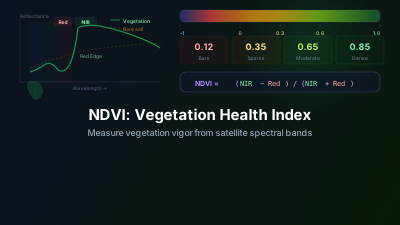
Quick Answer: NDVI measures vegetation health on a scale from -1 to +1 using the difference between near-infrared and red light reflected by plants. Healthy vegetation scores 0.6-0.9, while bare soil or water scores below 0.2. Off-Nadir Delta calculates NDVI automatically from Sentinel-2 data.
What is NDVI?
NDVI (Normalized Difference Vegetation Index) is the most widely used satellite-derived vegetation index. It exploits a fundamental property of healthy plants: they strongly reflect near-infrared (NIR) light while absorbing red light for photosynthesis.
The formula is simple:
NDVI = (NIR - Red) / (NIR + Red)
This produces values from -1 to +1, where:
| NDVI Range | Interpretation |
|---|---|
| -1.0 to 0.0 | Water, snow, clouds |
| 0.0 to 0.1 | Bare soil, rock, sand |
| 0.1 to 0.2 | Sparse vegetation, urban areas |
| 0.2 to 0.4 | Grassland, shrubland |
| 0.4 to 0.6 | Moderate vegetation, crops |
| 0.6 to 0.9 | Dense, healthy vegetation, forests |
The live NDVI map shows current NDVI worldwide, which makes these ranges concrete.
Why NDVI Matters
NDVI is used across multiple industries:
Agriculture
Farmers use NDVI to detect crop stress before it's visible to the eye. A drop in NDVI can indicate:
- Water stress (drought)
- Nutrient deficiency
- Pest or disease damage
- Uneven fertilizer application
Forestry
NDVI time-series reveal deforestation, forest degradation, and post-fire recovery. Sudden drops in NDVI over forested areas often indicate logging or wildfire damage.
Urban Planning
NDVI maps help planners identify urban heat islands (low NDVI) and green corridors (high NDVI), supporting decisions about where to add parks or tree cover.
Environmental Monitoring
Long-term NDVI trends track desertification, wetland changes, and the effects of climate change on ecosystems.
How to Calculate NDVI with Off-Nadir Delta
Step 1: Search for Sentinel-2 Data
Open the Satellite Images panel and select Sentinel-2 L2A. Set your area of interest and date range. Look for imagery with low cloud cover (below 20% is ideal).
Step 2: Add Imagery to Map
Select a suitable scene and add it to the map. By default, you'll see the true-color (RGB) composite.
Step 3: Apply NDVI Visualization
In the Layer Manager, find your Sentinel-2 layer and switch the visualization to NDVI. The platform automatically calculates NDVI from bands B8 (NIR, 842nm) and B4 (Red, 665nm).
Step 4: Interpret Results
The NDVI layer uses a red-yellow-green color ramp (RdYlGn):
- Green: Healthy, dense vegetation (NDVI > 0.6)
- Yellow: Moderate vegetation (NDVI 0.3-0.6)
- Red/Orange: Sparse vegetation, bare soil, or water (NDVI < 0.3)
Practical Tips
-
Seasonal variation is normal — NDVI naturally drops in winter for deciduous vegetation. Compare the same season across years for meaningful trend analysis.
-
Cloud shadows affect NDVI — Even if a pixel isn't flagged as cloudy, cloud shadows reduce NDVI values. Check the true-color image to verify anomalies.
-
Water bodies show negative NDVI — This is expected. Water absorbs NIR, producing negative values. This property is actually useful for water body detection.
-
Compare with SAR for cloud-free monitoring — When persistent clouds prevent optical NDVI calculation, SAR data can provide complementary vegetation information through radar backscatter.
NDVI Reference Values by Crop and Vegetation Type
Knowing what values to expect for specific land covers helps you quickly recognize anomalies. These are representative Sentinel-2 NDVI values under typical conditions:
| Land Cover / Crop | NDVI — Peak Season | NDVI — Off-Season or Stressed |
|---|---|---|
| Winter wheat (heading stage) | 0.65–0.80 | 0.20–0.40 after senescence |
| Maize / corn (peak biomass) | 0.70–0.85 | 0.30–0.50 under water stress |
| Rice paddies (tillering–heading) | 0.55–0.75 | 0.05–0.15 (fallow, flooded) |
| Tropical rainforest | 0.80–0.90 | 0.65–0.78 (dry season) |
| Temperate deciduous forest | 0.60–0.80 (summer) | 0.10–0.25 (winter) |
| Savanna / dry grassland | 0.25–0.55 (wet season) | 0.05–0.15 (dry season) |
| Bare soil | 0.05–0.20 | — |
| Urban (mix of buildings and parks) | 0.10–0.35 | — |
Reading a seasonal NDVI curve: For a temperate winter wheat field, expect NDVI to sit low (0.10–0.20) after sowing in autumn, rise steeply through late winter and spring as the canopy develops, peak at 0.70–0.80 around heading in May–June, then drop sharply to 0.20–0.30 within 2–3 weeks of harvest. A peak that never reaches 0.60, or a delayed green-up, is an early indicator of stress — often visible in NDVI data weeks before physical symptoms appear in the field.
When NDVI saturates: Dense tropical forest often plateaus near the top of the scale. At those values, subtle degradation — selective logging of individual trees, early-stage canopy thinning — moves NDVI so little that the change can be hard to separate from measurement noise or ordinary phenological variation. In high-biomass scenarios, the Sentinel-2 Red Edge NDVI (using B8A at 865 nm and B5 at 705 nm instead of the standard B8/B4 pair) remains more sensitive, making it better suited for detecting subtle forest change.
NDVI vs Other Vegetation Indices
While NDVI is the most popular, other indices exist for specific needs:
- EVI (Enhanced Vegetation Index): Better for high-biomass areas where NDVI saturates
- SAVI (Soil-Adjusted Vegetation Index): Reduces soil background effects in sparse canopies
- NDWI (Normalized Difference Water Index): Focuses on water content rather than greenness
NDVI remains the best starting point for most vegetation analysis due to its simplicity, extensive research validation, and straightforward interpretation.
Next Steps
- Visualize NDVI for any region now with NDVI Online Viewer
- Set up automated NDVI time series with Area Monitoring for long-term tracking
- Try Change Detection to track NDVI changes over time
- Compare SAR vs Optical approaches for vegetation monitoring
- Explore Sentinel-2 Viewer for more band combinations
Related reading
A single NDVI value describes one date. Tracking it over a fixed area turns it into a baseline you can judge new readings against, which is a different setup with its own pitfalls — measuring a number versus watching for events covers choosing the index, the minimum history needed before anything can be flagged, and why seasonality has to be inside the baseline rather than outside it.

Remote sensing specialist with 10+ years in satellite data processing and AI. Founder of Off-Nadir Lab. Ph.D. in Informatics (Yokohama National University, 2026). Master's in Earth System Science and Technology (Kyushu University). Co-author, Remote Sensing Encyclopedia. More about the author →