
Satellite Image Difference Analysis: A Step-by-Step Practical Guide
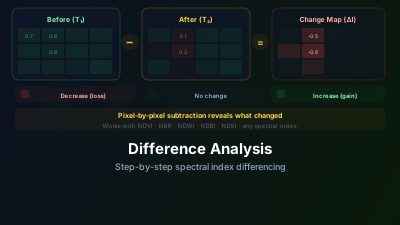
Quick Answer: Difference analysis subtracts one satellite image from another to highlight changes. Select two cloud-free images from different dates, apply the same visualization (e.g., NDVI), and compute the difference. Positive values indicate increase (e.g., vegetation growth), negative values indicate decrease (e.g., deforestation). Always use same-season imagery to avoid false changes from phenology, and verify results against true-color imagery.
What Is Difference Analysis?
Difference analysis is the simplest form of change detection — subtract one image from another, and anything that changed will stand out.
Difference = Image_after - Image_before
Where nothing changed, the difference is near zero. Where something changed, the difference is positive (increase) or negative (decrease). It sounds trivial, but this simple operation is one of the most powerful tools in remote sensing.
When Difference Analysis Works Best
This approach excels when the change is:
- Abrupt — Fires, floods, construction, deforestation
- Spectrally distinct — The changed area looks significantly different in satellite imagery
- Spatially coherent — The change covers an area larger than a few pixels
It works less well for:
- Gradual changes (slow vegetation decline over years)
- Sub-pixel changes (a single building in a 10m pixel)
- Changes masked by other variability (seasonal phenology, atmospheric conditions)
Step-by-Step Workflow
Step 1: Define Your Objective
What change are you looking for? This determines which index to difference:
| Change Type | Best Index to Difference |
|---|---|
| Vegetation loss/gain | NDVI, EVI |
| Fire damage | NBR |
| Water extent change | NDWI/MNDWI |
| Urban expansion | NDBI |
| General land surface change | SWIR composite |
Step 2: Select Your Image Pair
This is the most critical step. Poor image selection leads to false changes.
Requirements for a good image pair:
- Same sensor — Don't mix Sentinel-2 with Landsat unless you understand inter-calibration
- Cloud-free over the area of interest
- Same season (ideally same month) if comparing across years — this eliminates phenological false changes
- Similar sun angle if possible — reduces shadow-related artifacts
For event-based analysis (fire, flood):
- Before image: as close to the event as possible, but before it started
- After image: shortly after the event, once it's fully visible
Step 3: Apply the Same Visualization to Both Images
Load both images and apply identical visualization settings. For NDVI differencing, both images should show NDVI. For NBR-based burn assessment, both should show NBR.
Consistent visualization is essential — if the min/max scaling differs between images, the difference will be meaningless.
Step 4: Compute the Difference
Off-Nadir Delta's change detection tool handles this automatically:
- Select the before and after images
- Choose the index to difference
- The tool computes pixel-by-pixel subtraction and displays the result
The output is a difference map where:
- Red/negative values = decrease (e.g., vegetation loss)
- Blue/positive values = increase (e.g., vegetation growth)
- Gray/near-zero = no significant change
Step 5: Interpret the Results
Don't trust the difference map blindly. Always verify:
- Check true-color imagery — Do the detected changes make visual sense?
- Look for spatial patterns — Real changes have coherent spatial patterns. Random-looking scatter is usually noise.
- Consider the context — A large negative NDVI difference near a river during flood season might be flooding, not deforestation.
- Check the magnitude — Small differences (±0.05 in NDVI) are usually noise or atmospheric variation. Significant changes typically show differences > 0.1.
Common Mistakes and How to Avoid Them
Mistake 1: Comparing Different Seasons
This is the most common error in difference analysis. Summer vs. winter comparison will show "deforestation" everywhere deciduous trees grow — because they naturally lose leaves in winter.
Fix: Always compare same-season imagery. If you're tracking annual change, compare June 2024 with June 2025, not June 2024 with December 2024.
Mistake 2: Ignoring Cloud and Shadow Effects
A small cloud in one image but not the other creates a strong false change signal. Cloud shadows are even worse — they're easy to miss visually but produce significant spectral differences.
Fix: Inspect both images for clouds and shadows before differencing. If you can't find cloud-free imagery, use SAR-based change detection instead.
Mistake 3: Using Raw Bands Instead of Indices
Differencing raw spectral bands (e.g., just the red band) amplifies atmospheric and illumination differences that have nothing to do with surface change.
Fix: Use normalized indices (NDVI, NBR, NDWI, etc.). The normalization reduces atmospheric effects because both bands are affected similarly.
Mistake 4: Over-interpreting Small Differences
Not every non-zero pixel in a difference map represents real change. Sensor noise, atmospheric variation, and slight geometric misalignment all produce small differences.
Fix: Apply a significance threshold. For NDVI differencing, changes less than ±0.1 are generally not reliable. For dNBR, the standard threshold for meaningful burn is 0.1.
Practical threshold reference:
| Index | Noise Floor | Likely Real Change | Definite Change | Notes |
|---|---|---|---|---|
| NDVI difference | < ±0.05 | ±0.05–0.10 | > ±0.10 | Seasonal pairs; atmospheric correction applied |
| dNBR | < 0.10 | 0.10–0.27 | > 0.27 | Standard USGS burn severity thresholds |
| NDWI difference | < ±0.05 | ±0.05–0.15 | > ±0.15 | Same-season pairs reduce tidal/phenological noise |
| SAR VV difference (dB) | < ±0.5 dB | ±0.5–2 dB | > ±2 dB | Flood: typically −3 to −8 dB decrease |
| NDBI difference | < ±0.05 | ±0.05–0.10 | > ±0.10 | Urban growth: positive values; demolition: negative |
Advanced Tips
Use Relative Differencing for Better Comparability
Standard differencing gives absolute change. But a 0.1 NDVI decrease means something very different in a dense forest (NDVI 0.9 → 0.8) versus sparse grassland (NDVI 0.2 → 0.1).
Relative differencing normalizes by the initial value:
Relative Difference = (After - Before) / Before
This gives percentage change, making results comparable across different land cover types.
Combine Multiple Indices
If you're uncertain about a detected change, compute differences in multiple indices. A genuine vegetation loss event will show negative dNDVI, negative dNBR, and potentially positive dNDBI. If only one index shows change, it might be an artifact.
Consider SAR Complementarity
Optical difference analysis fails under clouds. SAR imagery can fill this gap — SAR coherence change and backscatter differencing detect surface changes independently of weather conditions.
Try It in Off-Nadir Delta
- Open the Change Detection guide to understand the workflow
- Load Sentinel-2 imagery from two different dates over your area of interest
- Apply the same index (NDVI, NBR, etc.) to both images
- Use the difference analysis tool to compute and visualize changes
- Toggle between the original images and the difference map to verify your results

Remote sensing specialist with 10+ years in satellite data processing and AI. Founder of Off-Nadir Lab. Ph.D. in Informatics (Yokohama National University, 2026). Master's in Earth System Science and Technology (Kyushu University). Co-author, Remote Sensing Encyclopedia. More about the author →