
Choosing the Right Colormap for Satellite Data Visualization
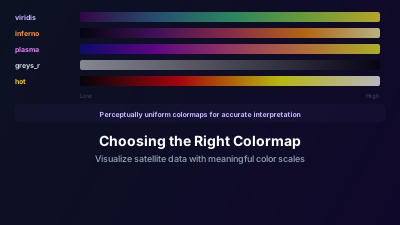
Quick Answer: Sequential colormaps (viridis, inferno) are best for continuous data like elevation or backscatter intensity. Diverging colormaps work for data with a meaningful center point, like NDVI difference maps. Never use rainbow/jet — it creates false boundaries and is unreadable for colorblind users. Viridis is the safest default: it's perceptually uniform, colorblind-friendly, and prints well in grayscale.
Why Do Colormaps Matter?
The short answer: use a perceptually uniform sequential colormap (viridis is the safest default) for continuous data, a diverging colormap for data with a meaningful center point, and never rainbow/jet. A satellite image is fundamentally an array of numbers, and the colormap translates those numbers into colors your visual system can interpret. Choose poorly, and you'll see patterns that don't exist — or miss patterns that do.
This isn't just aesthetics. Colormap choice directly affects:
- Pattern detection accuracy — Can you see the gradient, or does it look like discrete steps?
- Quantitative estimation — Can you roughly estimate a value from its color?
- Anomaly detection — Do real features stand out, or do they blend into colormap artifacts?
Types of Colormaps
Sequential Colormaps
Go from low values (dark) to high values (bright) through a smooth gradient. Best for data with a natural ordering from low to high.
| Colormap | Character | Best For |
|---|---|---|
| Viridis | Purple → green → yellow | General purpose, safest default |
| Inferno | Black → red → yellow → white | High dynamic range data, dramatic visualization |
| Plasma | Purple → orange → yellow | Similar to inferno, slightly less contrast at extremes |
| Hot | Black → red → yellow → white | Temperature-like data, thermal imagery |
| YlOrBr | Yellow → orange → brown | Soil moisture, elevation, earth-toned data |
| Greys_r | White → black | Traditional remote sensing display, SAR imagery |
Diverging Colormaps
Two sequential ramps meeting at a neutral center. Best for data with a meaningful zero or center point.
These are ideal for difference maps where negative = decrease, zero = no change, positive = increase.
Categorical Colormaps
Distinct colors for distinct classes. Used for classification maps (land cover types, crop types) but not for continuous satellite data.
Note that colormaps apply to single-band, continuous data. Multi-band RGB displays are a different topic — see false color composites for how band combinations work.
What's Wrong With the Rainbow (Jet) Colormap?
Quite a lot, perceptually. The rainbow colormap is still widely used, but it distorts the data it displays: equal data steps don't look equal, large portions are indistinguishable to colorblind readers, and its bright yellow band manufactures boundaries that don't exist in the numbers. Four specific problems:
-
Perceptual non-uniformity — Equal data differences produce unequal perceived color differences. The yellow band is much brighter than the blue and red bands, creating false "features" at yellow boundaries.
-
Colorblind inaccessibility — Roughly 8% of men have some form of color vision deficiency. Red-green colorblindness makes large portions of the rainbow colormap indistinguishable.
-
Grayscale failure — When printed in black-and-white, the rainbow colormap becomes a confusing mess with no consistent light-to-dark ordering.
-
False boundaries — The human visual system perceives sharp transitions between hue categories (blue→cyan, green→yellow). These perceived "edges" in the colormap create false boundaries in the data.
Colormap Selection Guide
SAR Backscatter Intensity
Recommended: Greys_r (reversed grayscale)
SAR imagery is traditionally displayed in grayscale, where brightness corresponds to backscatter intensity. This is intuitive: bright = strong return (urban, rough surfaces), dark = weak return (water, smooth surfaces). Most SAR literature uses grayscale, making it easier to communicate your results — see the practical guide to reading SAR images for what those bright and dark patterns mean.
Vegetation Indices (NDVI, EVI, SAVI)
Recommended: Custom green ramp or diverging red-green
For NDVI and similar vegetation indices, a colormap that goes from brown/red (low vegetation) through yellow (sparse vegetation) to green (dense vegetation) is intuitive because it matches the actual landscape colors. It also matches how the index behaves: as NASA Earthdata puts it, "low values of NDVI generally correspond to barren areas of rock, sand, exposed soils, or snow, while higher NDVI values indicate greener vegetation" — so a brown-to-green ramp reads correctly at a glance.
Water Indices (NDWI, MNDWI)
Recommended: Blue sequential or diverging blue-brown
Blue for water is culturally universal and immediately understood. A diverging colormap with brown for land and blue for water detection makes the land-water boundary obvious.
Burn Severity (dNBR)
Recommended: Diverging green-red
Green for unburned/regrowth, neutral for no change, red/orange for burn severity. This matches the traffic-light intuition (green = good, red = bad).
Elevation and Terrain
Recommended: YlOrBr or terrain colormaps
Earth tones (greens for low elevations, browns for mid, whites for high) match the natural appearance of landscapes and are easily interpreted.
General Purpose / Unknown Data
Recommended: Viridis
When you're exploring unfamiliar data and don't know what patterns to expect, viridis is the safest choice. It's perceptually uniform (equal data steps produce equal perceived color steps), works for colorblind users, and maintains ordering when printed in grayscale.
How Should You Set Min/Max Scaling?
Start with percentile-based scaling — 2nd percentile as min, 98th as max — and switch to fixed, domain-specific ranges when comparing scenes. Even with the perfect colormap, poor min/max scaling ruins the visualization: the colormap maps the full range between your min and max values, so if the range is too wide, subtle features disappear, and if it's too narrow, you clip important data.
Auto-scaling
Most tools set min/max to the data's actual range. This works when data is well-distributed but fails when outliers stretch the range (a single very bright pixel makes everything else look dark).
Percentile-based scaling
Set min to the 2nd percentile and max to the 98th percentile. This clips the extreme outliers and uses the full colormap for the meaningful data range. This is usually the best starting point.
Domain-specific scaling
For standardized indices, use known ranges:
- NDVI: -0.2 to +0.9
- NDWI: -0.5 to +0.5
- SAR backscatter (dB): -25 to +5
These fixed ranges make different scenes directly comparable.
Practical Tips
Test with Multiple Colormaps
Don't commit to the first colormap you try. Switch between 2-3 options to see if the patterns you're seeing are real or colormap artifacts. If a feature only appears with one colormap, it's likely an artifact.
Match Colormaps to Your Audience
Technical audiences familiar with SAR expect grayscale. General audiences may find viridis or inferno more engaging. Environmental reports benefit from intuitive green/brown/blue schemes.
Be Consistent Across Comparisons
When comparing multiple images (different dates, different areas), always use the same colormap with the same min/max scaling. Different colormaps make visual comparison meaningless. Operational products do this deliberately — NOAA Coral Reef Watch, for example, publishes its global heat-stress maps with fixed, standardized color scales so that any two dates can be compared directly.
Colormaps in Off-Nadir Delta
Off-Nadir Delta applies colormaps tailored to each data type:
Sentinel-2 optical — Each spectral index uses an optimized colormap automatically:
- NDVI, EVI, SAVI, NBR → RdYlGn (Red-Yellow-Green) for intuitive vegetation mapping
- NDWI, MNDWI → Blues for water detection
- NDBI → Oranges for built-up areas
- NDSI → CoolWarm (Blue-White-Red) for snow/ice
- Iron Oxide → Hot (Black-Red-Yellow-White)
- Clay Minerals → Terrain for geological context
Sentinel-1 SAR — Grayscale display for VV/VH polarization, with RdYlGn for SAR vegetation indices (RVI, RFDI).
VIIRS Nighttime Lights — User-selectable colormaps including Greys_r, Viridis, Plasma, Inferno, Hot, and YlOrBr. Switch between them using the visualization selector to find the best representation for nighttime light intensity data.
The key takeaway: you don't need to manually choose colormaps for most satellite data — the platform applies scientifically appropriate defaults. For nighttime lights, experiment with different options to highlight the patterns most relevant to your analysis.

Remote sensing specialist with 10+ years in satellite data processing and AI. Founder of Off-Nadir Lab. Ph.D. in Informatics (Yokohama National University, 2026). Master's in Earth System Science and Technology (Kyushu University). Co-author, Remote Sensing Encyclopedia. More about the author →