
Multi-Temporal SAR Color Composites: See Change in a Single Image
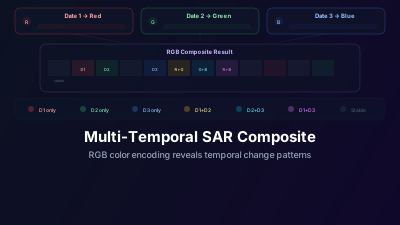
Quick Answer: A multi-temporal SAR color composite assigns three dates of SAR imagery to the Red, Green, and Blue channels. Areas that didn't change appear gray. Areas that changed between dates appear in color — the specific color tells you when the change happened. Red means the surface was bright only on date 1, blue means it was bright only on date 3. This technique visualizes months of change in a single glance.
The Concept
Standard SAR images are grayscale — a single date, a single band, displayed in shades of gray. Comparing changes requires toggling between dates, which is slow and makes it hard to see the spatial pattern of change.
Multi-temporal color composites solve this by encoding time as color:
- Red channel → SAR image from Date 1
- Green channel → SAR image from Date 2
- Blue channel → SAR image from Date 3
The result is a single color image where color indicates change and gray indicates stability.
Reading the Colors
Understanding what the colors mean is straightforward once you know the RGB assignment:
| Color | Meaning |
|---|---|
| White/Gray | Bright in all three dates → stable, no change |
| Black | Dark in all three dates → stable (e.g., calm water) |
| Red | Bright only on Date 1 → surface changed after Date 1 |
| Green | Bright only on Date 2 → temporary change on Date 2 |
| Blue | Bright only on Date 3 → new feature appeared by Date 3 |
| Yellow (Red + Green) | Bright on Dates 1 and 2, dark on Date 3 → disappeared by Date 3 |
| Cyan (Green + Blue) | Bright on Dates 2 and 3 → appeared after Date 1 |
| Magenta (Red + Blue) | Bright on Dates 1 and 3, not Date 2 → temporary disappearance on Date 2 |
Why This Works So Well for SAR
This technique is particularly powerful for SAR because:
- SAR is weather-independent — You can reliably get images at regular intervals without cloud gaps
- SAR is single-band — Each date naturally maps to one RGB channel (optical requires more complex band selection)
- SAR backscatter changes are meaningful — Changes in surface roughness, moisture, or structure produce clear backscatter differences
- Sentinel-1's 6-day repeat — Provides dense temporal coverage for selecting optimal date combinations
Best Applications
Flood Monitoring
Choose dates spanning a flood event:
- R: Pre-flood
- G: During flood
- B: Post-flood
Flooded areas (dark during flood, bright before and after) appear magenta. Permanently flooded areas stay black. Areas with residual flooding after the event appear red (bright pre-flood, dark during and after).
Agricultural Crop Monitoring
Choose dates at different growth stages:
- R: Planting season
- G: Peak growth
- B: Harvest
Different crops with different phenologies show different color patterns. A field that is bare→green→bare will appear green. A field that stays vegetated across all three dates appears gray.
Urban Development
Choose dates months or years apart:
- R: Earliest date
- G: Middle date
- B: Latest date
New construction appears cyan or blue (bright in later dates due to new hard surfaces). Demolished buildings appear red (bright only in the earliest date).
Ship Traffic Patterns
Ships appear as bright points in SAR. In a multi-temporal composite:
- A ship present on only one date appears in that date's color
- Shipping lanes where vessels are frequently present appear as colored streaks
- Ports and anchorages with persistent vessel presence appear gray/white
How to Create a Multi-Temporal Composite
Step 1: Select Three Dates
Choose dates that bracket your event or span your monitoring period. For event detection:
- Include a pre-event date, event date, and post-event date
For general monitoring:
- Space dates evenly (e.g., 3-month intervals for seasonal analysis)
Step 2: Ensure Consistent Processing
All three SAR scenes should have:
- Same orbit direction (ascending or descending)
- Same polarization (VV or VH)
- Same relative orbit number (same viewing geometry)
Mixing orbit directions or polarizations will introduce artificial color differences unrelated to surface change.
Step 3: Load and Assign Channels
In Off-Nadir Delta, load Sentinel-1 SAR imagery from your three chosen dates. Use the layer manager to view them as separate layers and toggle between them to visually confirm the changes you're looking for.
Step 4: Interpret Carefully
Remember:
- Color = change, not a specific surface type
- The same surface change can appear as different colors depending on your date assignment
- Very bright or very dark areas in all dates will appear white or black regardless of subtle changes
Tips for Better Composites
Use VH Polarization for Vegetation Change
VH (cross-polarization) is more sensitive to volume scattering from vegetation canopy. Deforestation and crop growth produce stronger signals in VH than VV.
Use VV Polarization for Water and Urban Change
VV (co-polarization) is more sensitive to surface scattering. Flood extent, ship detection, and urban change show better contrast in VV.
Match Orbit Directions
Always use scenes from the same orbit direction (ascending or descending). Mixing them changes the look angle, which changes the backscatter even if nothing on the ground changed — creating false color in your composite.
Consider Speckle
SAR speckle creates pixel-level noise that produces speckled color in composites. For cleaner results, apply speckle filtering before compositing, or use multi-look products.
The Bigger Picture
Multi-temporal composites are a visualization technique — they don't quantify change or produce statistics. But they're unmatched for exploratory analysis: scanning a large area to identify where changes occurred, what spatial patterns they form, and how they evolved over time.
Once you've identified interesting change areas in the composite, you can then apply quantitative methods like difference analysis to measure the change precisely.
Try It in Off-Nadir Delta
- Open Sentinel-1 SAR viewer
- Search for three dates over your area of interest
- Add all three to the map as separate layers
- Use the layer manager to toggle between dates and identify change areas
- Compare with Sentinel-2 optical imagery to confirm the nature of detected changes

Remote sensing specialist with 10+ years in satellite data processing and AI. Founder of Off-Nadir Lab. Ph.D. in Informatics (Yokohama National University, 2026). Master's in Earth System Science and Technology (Kyushu University). Co-author, Remote Sensing Encyclopedia. More about the author →