
STAC Explained: The Standard That Makes Satellite Data Discoverable
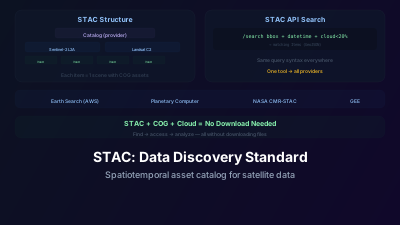
Quick Answer: STAC (SpatioTemporal Asset Catalog) is an open specification for describing geospatial data so it can be searched and discovered. A STAC Item describes one unit of data (e.g., a single Sentinel-2 scene) with its spatial extent, time, and links to actual data files (COGs, etc.). Items are grouped into Collections (e.g., all Sentinel-2 L2A data). The STAC API enables spatial/temporal search across millions of items. STAC has been adopted by major providers: Microsoft Planetary Computer, Element 84 Earth Search, NASA CMR-STAC, and many others. Before STAC, every data provider had a different search API — STAC unifies discovery so one client library works everywhere.
STAC (SpatioTemporal Asset Catalog) is an open specification that gives every provider's geospatial data the same searchable structure — the project describes it as "a common language to describe geospatial information, so it can more easily be worked with, indexed, and discovered" (stacspec.org). Once you know STAC, you can search any STAC-compliant catalog using the same tools and the same query patterns.
That matters because finding satellite data used to be harder than analyzing it. Each data provider had a different search interface, different metadata formats, different download mechanisms. Searching for Landsat data on USGS EarthExplorer worked completely differently from searching for Sentinel-2 on the Copernicus Open Access Hub (since replaced by the Copernicus Data Space Ecosystem, which itself exposes a STAC catalog), which worked differently from searching commercial data on provider-specific portals.
The Core Concepts
STAC Item
The atomic unit of STAC. One Item describes one spatiotemporal data unit — typically one satellite scene or one derived product.
An Item contains:
- id: Unique identifier
- geometry: GeoJSON footprint (the spatial extent on the ground)
- datetime: When the data was acquired
- properties: Metadata (cloud cover, sun angle, processing level, platform, instrument, etc.)
- assets: Links to actual data files (the COG for each band, a thumbnail, a metadata XML file, etc.)
Example: One Sentinel-2 L2A scene over Paris on 2024-06-15 would be one STAC Item, with assets linking to the COG files for each spectral band.
STAC Collection
A group of related Items — typically all data from one satellite product.
A Collection contains:
- Title and description: Human-readable information about the dataset
- Spatial and temporal extent: The overall coverage of all Items in the collection
- License: Data usage terms
- Provider information: Who produces and hosts the data
- Summaries: Ranges of key properties (e.g., cloud cover range, available bands)
Example: "Sentinel-2 Level-2A" would be a Collection containing millions of Items, one per scene.
STAC Catalog
A top-level container that organizes Collections and Items. A Catalog can be:
- Static: A set of JSON files on a web server or cloud storage, linked together. No search capability — just browseable.
- Dynamic (STAC API): A server that supports search queries (spatial, temporal, property filters)
STAC API
The search interface, built as an extension of the OGC API – Features standard. Standard endpoints:
/search: The main search endpoint. Accepts:
bbox: Bounding box (spatial filter)datetime: Time range (temporal filter)collections: Which collections to searchquery/filter: Property filters (e.g., cloud cover < 20%)limit: Number of results per page
Returns a GeoJSON FeatureCollection of matching STAC Items.
/collections: List available collections
/collections/{id}/items: Browse items in a specific collection
Why does STAC matter?
Because it removes per-provider friction. Before STAC, every archive had its own search interface, metadata schema, and download mechanism, so each new dataset meant learning a new portal and writing new code. With STAC, one query pattern and one client library work across providers. The before-and-after below shows how much of the boilerplate disappears.
Before STAC
Finding Sentinel-2 data for your area:
- Go to Copernicus Open Access Hub
- Learn its specific search interface
- Download scenes in .SAFE format
- Write custom code to read the metadata and find band files
Finding Landsat data:
- Go to USGS EarthExplorer
- Learn a completely different interface
- Download in a different format
- Write different code for different metadata structure
Finding data on AWS:
- Figure out the S3 bucket structure
- Parse index files in yet another format
- Different for each dataset
With STAC
from pystac_client import Client

catalog = Client.open("https://earth-search.aws.element84.com/v1")

results = catalog.search(
    collections=["sentinel-2-l2a"],
    bbox=[2.0, 48.5, 2.8, 49.0],
    datetime="2024-06-01/2024-06-30",
    query={"eo:cloud_cover": {"lt": 20}}
)

for item in results.items():
    red_url = item.assets["red"].href
    nir_url = item.assets["nir"].href
    # Process directly from cloud storage
The same code pattern works for any STAC catalog. Change the URL to Microsoft Planetary Computer, NASA's catalog, or any other STAC provider — the search syntax is identical.
Major STAC Catalogs
Element 84 Earth Search
- URL: earth-search.aws.element84.com
- Contents: Sentinel-2 L2A (COG), Landsat Collection 2, Sentinel-1 GRD, and more
- Hosting: AWS Open Data
- Key advantage: Data stored as COGs on S3 — accessible for direct cloud processing
Microsoft Planetary Computer
- URL: planetarycomputer.microsoft.com/api/stac/v1
- Contents: Sentinel-1/2, Landsat, MODIS, ASTER, Copernicus DEM, and hundreds more
- Key advantage: Integrated with Planetary Computer Hub (JupyterHub) for analysis
- Note: Some assets require token authentication (SAS tokens provided automatically in the Hub)
NASA CMR-STAC
- URL: cmr.earthdata.nasa.gov/stac
- Contents: NASA's entire Earthdata Earth science catalog
- Key advantage: Access to NASA-specific products (MODIS, VIIRS, GEDI, ICESat-2, etc.)
Google Earth Engine STAC Catalog
- URL: earthengine-stac.storage.googleapis.com/catalog
- Contents: GEE's data catalog described in STAC format
- Note: Static catalog (browse only, not searchable via API)
Major STAC Catalogs: Coverage and Access Comparison
| Catalog | URL | Key Datasets | Data Location | Access Model |
|---|---|---|---|---|
| Element 84 Earth Search | earth-search.aws.element84.com/v1 | Sentinel-2 L2A, Sentinel-1 GRD, Landsat C2, Copernicus DEM | AWS Open Data (S3) | Free, no auth required |
| Microsoft Planetary Computer | planetarycomputer.microsoft.com/api/stac/v1 | Sentinel-1/2, Landsat, MODIS, ASTER, 100+ datasets | Azure Blob Storage | Free; SAS tokens for asset access (auto in Hub) |
| NASA CMR-STAC | cmr.earthdata.nasa.gov/stac | MODIS, VIIRS, GEDI, ICESat-2, ECOSTRESS, all NASA EO | NASA Earthdata (S3 + HTTPS) | Free; Earthdata login required for downloads |
| Google Earth Engine STAC | earthengine-stac.storage.googleapis.com | GEE full catalog in STAC format | GEE (not direct COG) | Static browse only; processing via GEE API |
| Copernicus Data Space | catalogue.dataspace.copernicus.eu/stac | Sentinel-1 to 6, SPOT, Envisat archive | Copernicus Object Storage | Free; registration required |
| USGS STAC (Landsatlook) | landsatlook.usgs.gov/stac-server | Landsat Collection 2 (L1+L2) | AWS + USGS | Free, no auth for STAC search |
| JAXA G-Portal STAC | gportal.jaxa.jp/stac | ALOS-2, GCOM-W, GCOM-C | JAXA servers | Free; registration required |
Scale of STAC today: the major public catalogs index Items in the tens of millions and upward, across petabyte-scale archives, and both figures grow every day as new acquisitions are ingested — which is why it is more useful to query an endpoint for its current count than to quote one here. The relevant point is structural rather than numerical: before STAC, reaching data at this scale required learning dozens of different APIs and download portals, a barrier that excluded most non-specialist users from working with satellite data at all.
What are STAC extensions?
STAC's core is deliberately minimal — just enough to say what a dataset is, where it sits, and when it was captured. Extensions add domain-specific metadata in a standardized way, so a SAR scene's polarization or an optical scene's cloud cover is expressed identically no matter who publishes it. The most widely used:
eo (Electro-Optical): Cloud cover, band information, constellation
sar: Polarization, frequency band, observation direction, product type
view: Off-nadir angle, sun azimuth/elevation
scientific: DOI, citation information
processing: Processing level, software version
Extensions ensure that domain-specific metadata is described consistently across providers.
Working with STAC in Practice
Python Libraries
pystac-client: Search STAC APIs pystac: Create, read, and write STAC objects stackstac: Load STAC search results directly into xarray DataArrays odc-stac: Open Data Cube integration with STAC
Typical Workflow
- Search: Use pystac-client to find relevant scenes
- Filter: Refine by cloud cover, date, processing level
- Access: Get asset URLs (COG links) from matching Items
- Load: Use stackstac or rioxarray to load data directly from cloud storage
- Analyze: Process with xarray, numpy, scikit-learn, etc.
No download step. Data flows directly from cloud storage into your analysis environment.
How do you build your own STAC catalog?
Making your own geospatial data discoverable ranges from generating a folder of static JSON files to running a full search API. For small, stable datasets, static catalogs hosted on any web server are enough; for large or frequently updated archives, a database-backed STAC API is the standard route. The main building blocks:
stac-fastapi: Python-based STAC API server backed by PostgreSQL or Elasticsearch
pgSTAC: PostgreSQL extension optimized for STAC Item storage and search
Static catalogs: For smaller datasets, generate static STAC JSON files and host on any web server
The Broader Impact
STAC has become the de facto standard for Earth observation data discovery. Its adoption by major providers means that the "data discovery problem" — historically one of the biggest barriers to using satellite data — is largely solved for major public datasets.
The combination of STAC (find the data) + COG (access the data efficiently) + cloud computing (process the data where it lives) has created a fundamentally new workflow for satellite data analysis. You can go from "I need Sentinel-2 data for this area" to "I have analysis results" without ever downloading a file to your local computer. It is the same pairing of standards that powers modern browser-based WebGIS platforms.
This isn't just a convenience improvement — it's a structural change that makes satellite data analysis accessible to anyone with a Python environment and an internet connection. The infrastructure barrier that once limited satellite data use to organizations with expensive GIS setups has been largely removed by open standards like STAC. Most of the archives listed above are also free to use — see the overview of free satellite data sources, or browse the data sources available in a browser viewer without writing a line of code.

Remote sensing specialist with 10+ years in satellite data processing and AI. Founder of Off-Nadir Lab. Ph.D. in Informatics (Yokohama National University, 2026). Master's in Earth System Science and Technology (Kyushu University). Co-author, Remote Sensing Encyclopedia. More about the author →