
Radiometric Calibration: From Digital Numbers to Physical Measurements
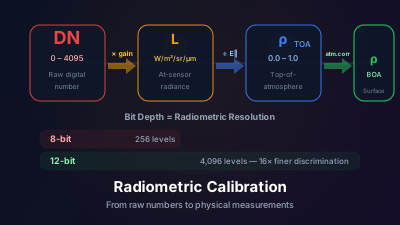
Quick Answer: Satellite sensors record energy as digital numbers (DN) — arbitrary integer values with no physical meaning. Radiometric calibration converts these DNs into Top-of-Atmosphere radiance (W/m²/sr/μm) or reflectance using gain and offset coefficients provided in image metadata. Without calibration, pixel values cannot be compared across dates, sensors, or even different bands of the same image. Modern datasets like Sentinel-2 Level-1C are already calibrated to TOA reflectance.
Radiometric calibration converts the arbitrary digital numbers (DN) a satellite sensor records into physical units — radiance or reflectance — using gain and offset coefficients stored in the image metadata. Without it, pixel values can't be meaningfully compared across dates, sensors, or even different bands of the same image.
Open a raw Landsat TM scene and the pixel values run from 0 to 255 — 8-bit integers, nothing more. Suppose Band 4 (NIR) reads 212 over a dense forest canopy. What does 212 mean physically? On its own, nothing — it is simply the count the sensor's analog-to-digital converter assigned to that signal.
That's the fundamental problem radiometric calibration solves. NASA's Earth Observation data glossary defines calibration as "the process of quantitatively defining the system responses to known, controlled signal inputs" — in other words, tying what the sensor reports back to a physical quantity you can trust.
What Do Satellite Sensors Actually Record?
A satellite sensor's detector converts incoming photons into an electrical signal, which is digitized into a number — the Digital Number (DN). The DN is not a physical measurement; it's an integer whose meaning depends on the sensor's electronics. Specifically, it depends on:
- How much light reached the sensor (the actual physical quantity we want)
- The sensor's electronic gain setting
- The detector's response characteristics
- The analog-to-digital conversion bit depth (8-bit gives 0–255; 12-bit gives 0–4095; 16-bit gives 0–65535)
Two different sensors looking at the exact same patch of ground will record different DNs. The same sensor with different gain settings will also record different DNs. Without calibration, you're working with arbitrary numbers.
The Calibration Chain
Calibration converts DNs to physically meaningful quantities through a series of steps:
Step 1: DN → Radiance
At-sensor radiance (Lλ) is the power per unit area per unit solid angle per unit wavelength reaching the sensor. The conversion is linear:
Lλ = Gain × DN + Offset
The gain and offset (also called scale and bias, or multiplicative and additive factors) are determined before launch through laboratory calibration and updated in-orbit using known reference targets — usually the moon, deep space, and onboard calibration lamps.
These coefficients are stored in the image metadata. For Landsat, they're in the MTL file. For Sentinel-2, they're in the XML metadata. (For a refresher on how the sensor gets the photons in the first place, see how satellites capture images.)
Step 2: Radiance → TOA Reflectance
Radiance values still depend on solar illumination — a scene acquired in December (low sun angle in the Northern Hemisphere) will have lower radiance than the same scene in June, even if surface reflectance hasn't changed.
To remove this solar illumination dependency, we convert radiance to Top-of-Atmosphere reflectance (ρTOA):
ρTOA = (π × Lλ × d²) / (ESUNλ × cos θs)
Where:
- d = Earth-Sun distance (in astronomical units; varies ~3% seasonally)
- ESUNλ = solar irradiance for the band
- θs = solar zenith angle
TOA reflectance is dimensionless (0 to ~1) and comparable across dates because the solar illumination effect has been normalized.
Step 3: TOA Reflectance → Surface Reflectance
This final step — atmospheric correction — removes the atmosphere's influence to yield what the surface actually reflected. We covered this in detail in a separate article on why atmospheric correction matters.
Why Does Bit Depth Matter?
Bit depth sets how finely a sensor can distinguish brightness levels — its radiometric resolution. Older sensors like Landsat 5 TM recorded 8-bit data (256 levels), cramming the entire range of possible radiance values into 256 bins. Subtle differences between, say, two slightly different soil types might map to the same DN — you'd lose the information.
Modern sensors use higher bit depths:
| Sensor | Bit Depth | DN Range | Radiometric Resolution |
|---|---|---|---|
| Landsat 5 TM | 8-bit | 0–255 | Coarse |
| Landsat 8 OLI | 12-bit | 0–4095 | Good |
| Sentinel-2 MSI | 12-bit | 0–4095 | Good |
| WorldView-3 | 11-bit | 0–2047 | Good |
Higher bit depth means finer discrimination between similar surfaces. This is particularly important in low-contrast environments like water bodies, where the difference between clear and slightly turbid water might span only a few DN values in 8-bit data but dozens of values in 12-bit.
Why This Matters in Practice
Comparing Images Over Time
Without calibration, you can't meaningfully compare pixel values from different dates. Gain settings can change, solar geometry changes seasonally, and even the sensor's detector response drifts over time. Calibrating to reflectance normalizes all of these factors.
Computing Spectral Indices
NDVI = (NIR − Red) / (NIR + Red) assumes that the values being subtracted and divided are in the same units. Computing NDVI from DNs is technically invalid — the gain and offset for the NIR band are different from the Red band, so the arithmetic doesn't produce a physically meaningful result.
In practice, DN-based NDVI often looks plausible because the gains are similar enough that the errors partially cancel. But "looks plausible" isn't the same as "correct." For research-quality results, always use calibrated reflectance.
Cross-Sensor Analysis
If you want to combine Landsat and Sentinel-2 data — perhaps to improve temporal coverage, as the Harmonized Landsat Sentinel-2 (HLS) project does — you must work with calibrated reflectance values. DNs from different sensors are completely incomparable.
Modern Convenience
Here's the good news: most current satellite data products are already calibrated for you.
Sentinel-2 Level-1C products are provided as TOA reflectance (scaled by 10,000 to avoid floating-point numbers — a DN of 3000 means reflectance of 0.30).
Sentinel-2 Level-2A products are surface reflectance, also scaled by 10,000.
Landsat Collection 2 Level-2 products are surface reflectance with scale factors provided in metadata.
You don't need to manually apply gain and offset coefficients for these datasets. But understanding what the numbers represent — and what processing has already been applied — helps you avoid misinterpretation.
When Do You Still Need Manual Calibration?
Mostly when working with older or specialized data. Current standard products from Sentinel-2 and Landsat arrive pre-calibrated, so manual application of gain and offset coefficients is the exception rather than the rule. The situations that still require it:
- Older archived data (Landsat 1–5) that may be distributed as raw DNs
- Commercial satellite data that comes as DNs with calibration coefficients
- Airborne sensor data from custom instruments
- Cross-calibration studies where you need to harmonize multiple sensors precisely
In these cases, the coefficients are always provided in the metadata. The math is simple — it's a linear transformation. The hard part is knowing which coefficients to use and keeping track of what processing has already been applied.
A Common Mistake
A common error is applying calibration coefficients to data that has already been calibrated — doubling the correction. Sentinel-2 Level-1C is already in TOA reflectance; applying the gain/offset from the metadata again produces nonsensical values. Always check the processing level of your data before applying corrections — it's a close cousin of the beginner mistakes that quietly corrupt analyses.
The chain from raw detector output to surface reflectance isn't glamorous work, but it's the foundation that makes everything else in remote sensing physically meaningful. Skip it, and you're doing math on arbitrary numbers.

Remote sensing specialist with 10+ years in satellite data processing and AI. Founder of Off-Nadir Lab. Ph.D. in Informatics (Yokohama National University, 2026). Master's in Earth System Science and Technology (Kyushu University). Co-author, Remote Sensing Encyclopedia. More about the author →