
Orthorectification & Geometric Correction, Explained
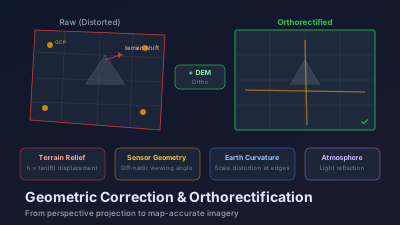
Quick Answer: Raw satellite images contain geometric distortions from sensor orientation, Earth's curvature, atmospheric refraction, and terrain relief. Orthorectification removes all these distortions to produce a geometrically accurate, map-like image. The process requires three inputs: the raw image, a sensor model (describes exactly how the sensor was oriented during acquisition), and a Digital Elevation Model (corrects terrain-induced displacement). Without terrain correction, a mountain peak might be displaced by 50-100m in a typical satellite image. Sentinel-2 L2A products are already orthorectified; Landsat Collection 2 products are orthorectified. Raw commercial imagery (e.g., WorldView) requires user-side orthorectification. The accuracy standard for most applications is sub-pixel RMS error relative to a reference dataset.
Overlay a raw satellite image on a basemap and linear features such as roads frequently fail to line up. The mismatch is not random: it is largest in mountainous terrain and close to negligible over flat ground, because relief displacement grows with terrain height and with how far off-nadir the sensor was looking. The image is not "wrong" — it is raw, still carrying the geometric distortions of the acquisition geometry. Which is the fundamental point: a satellite image is not a map until it's been orthorectified.
Why Satellite Images Are Geometrically Distorted
A satellite image is a perspective projection — the sensor looks at the Earth from a specific position and angle. Several factors cause the resulting image to differ from a true orthographic (straight-down) view:
Sensor Geometry
The satellite isn't directly above every pixel in the image. For a pushbroom sensor scanning a 290 km swath from 786 km altitude (Sentinel-2), pixels at the swath edges are viewed at angles up to ~10.3° from nadir. This oblique viewing angle causes geometric displacement.
Earth's Curvature and Rotation
Over a 290 km swath, Earth's curvature is not negligible. The surface curves away from the sensor, causing scale distortion — pixels at the swath edges cover more ground than pixels at the center. Additionally, Earth rotates during acquisition, causing a slight skew.
Atmospheric Refraction
Light bends as it passes through the atmosphere, and this bending varies with viewing angle and atmospheric conditions. The effect is small (typically <1 pixel for near-nadir viewing) but measurable for precise applications.
Terrain Relief (The Big One)
This is usually the largest source of distortion. A mountain peak is closer to the sensor than the surrounding valley floor. In the raw image, the peak appears displaced away from the nadir point — the taller the terrain, the larger the displacement.
The displacement formula: d = h × tan(θ)
Where h is the terrain height and θ is the off-nadir viewing angle. For a 1000m mountain viewed at 20° off-nadir:
- d = 1000 × tan(20°) = 364 meters
That's a 36-pixel displacement in 10m Sentinel-2 imagery. In mountainous areas with off-nadir viewing, terrain displacement dominates all other error sources.
The Correction Hierarchy
There are several levels of geometric correction, each addressing different distortion sources:
Level 1: Systematic Correction (Georeferencing)
Corrects for known sensor geometry, satellite orbit, and Earth rotation using the satellite's ephemeris (position/velocity data) and sensor model. No ground truth is needed.
Result: Image is roughly aligned to a map coordinate system, but may have residual errors of 10-100+ meters depending on orbit knowledge accuracy.
Level 2: Ground Control Point (GCP) Refinement
Uses identifiable features visible in both the satellite image and a reference dataset (another orthorectified image, or GPS-surveyed ground points) to refine the geometric model.
GCP requirements:
- Minimum 6-10 well-distributed points across the image
- Points should be at distinctive, permanent features (road intersections, building corners, dam walls)
- Avoid points on moving features (river banks, coastlines, vegetation edges)
Result: Sub-pixel accuracy in flat terrain, but terrain displacement remains uncorrected.
Level 3: Orthorectification
Adds a DEM to correct terrain-induced displacement. This is the critical step that produces a true orthographic projection — every pixel is positioned as if viewed from directly above.
Required inputs:
- The image with its sensor model (RPC coefficients or rigorous model)
- Ground control points (optional if sensor model is already well-calibrated)
- A DEM matching or exceeding the image resolution
DEM choice matters:
- Sentinel-2 uses the Copernicus DEM (30m) for its standard orthorectification
- For commercial 0.5m imagery, you need a DEM with <5m vertical accuracy
- Using SRTM (90m) for sub-meter imagery will leave residual terrain displacement
What Products Are Already Orthorectified?
Many freely available satellite products come pre-orthorectified:
| Product | Orthorectified? | Accuracy |
|---|---|---|
| Sentinel-2 L1C/L2A | Yes (Copernicus DEM) | ~12m absolute |
| Landsat Collection 2 | Yes (GLS ground control) | ~12m absolute |
| MODIS/VIIRS | Yes (coarse resolution) | ~50-100m |
| Planet PlanetScope | Yes (automatic) | ~10m |
| WorldView (raw) | No — requires user ortho | Varies |
| Pléiades (raw) | No — requires user ortho | Varies |
If you're using Sentinel-2 or Landsat, orthorectification is already done for you. The Copernicus and USGS ground segments handle this automatically.
You need to perform your own orthorectification primarily when:
- Working with raw commercial high-resolution imagery
- Working with aerial photography or drone imagery
- The standard orthorectification is insufficient (you need <3m accuracy)
- Using historical imagery that predates modern processing chains
A quick visual check either way is to drop the file into the GeoTIFF viewer and see whether roads and coastlines line up with the basemap.
The Orthorectification Workflow
Step 1: Sensor Model
Two types of sensor models are commonly provided:
Rational Polynomial Coefficients (RPCs): A mathematical approximation that maps image coordinates to ground coordinates using ratios of polynomials. RPCs are sensor-agnostic and simpler to use. Most commercial imagery is distributed with RPCs.
Rigorous sensor model: Describes the exact physical geometry — satellite position, velocity, attitude, sensor focal length, detector layout. More accurate than RPCs but sensor-specific.
Step 2: GCP Collection (If Needed)
For imagery with well-calibrated RPCs (most modern satellites), GCPs may be unnecessary — the RPC-based orthorectification alone achieves sub-pixel accuracy.
When GCPs are needed:
- Identify 10-20 points visible in both the satellite image and a reference orthoimage
- Measure the image coordinates (row, column) and ground coordinates (latitude, longitude, elevation) of each point
- Use these to refine the sensor model
Tip: Orthoimages from Google Earth or national mapping agencies work well as reference datasets for GCP collection.
Step 3: DEM Selection and Preparation
Choose a DEM appropriate for your image resolution:
- 30m imagery (Sentinel-2): Copernicus DEM 30m or SRTM 30m
- Sub-meter imagery: National LiDAR-derived DEMs (1-5m resolution) if available; otherwise Copernicus DEM with acceptance of some residual error
- Ensure the DEM is a DSM or DTM as appropriate: For urban areas, a Digital Surface Model (including buildings) may cause artifacts if buildings aren't in the imagery
Step 4: Resampling
The orthorectification process warps the original image to a new geometry. Each output pixel must be assigned a value interpolated from the input image.
Resampling methods:
- Nearest neighbor: Fastest, preserves original values, but produces jagged edges. Use for thematic/classified data.
- Bilinear interpolation: Smooth results, good for visual products. Slightly blurs the image.
- Cubic convolution: Sharpest results, best for visual interpretation. Can introduce small ringing artifacts.
For quantitative analysis (band ratios, indices), bilinear or cubic convolution is preferred because nearest neighbor can introduce spatial artifacts.
Accuracy Assessment
After orthorectification, verify the result:
- Visual check: Overlay on a reference basemap (OpenStreetMap, Google Earth). Roads and buildings should align.
- Quantitative check: Measure the residual displacement at independent check points (points NOT used as GCPs). Report as RMS error.
- Acceptable accuracy: For most applications, sub-pixel RMSE relative to the reference dataset.
Common problems:
- DEM artifacts (voids, spikes) cause localized distortions in the orthoimage
- Cloud shadows are displaced incorrectly (the shadow is on the ground surface, but the cloud is at altitude — the DEM correction is applied to the wrong surface)
- Bridge and overpass structures confuse the DEM, causing road discontinuities
Practical Implications
Understanding geometric correction helps you avoid common analytical errors:
- Multi-temporal analysis: All images in a time series must be co-registered to sub-pixel accuracy. Even if each image is individually orthorectified, residual misregistration of 1-2 pixels can produce apparent "changes" at sharp boundaries (field edges, building outlines) that are actually registration artifacts.
- Data fusion: Combining SAR and optical data requires geometric alignment to a common reference. SAR orthorectification is particularly challenging because the side-looking geometry causes layover and shadow effects that don't exist in optical imagery.
- GIS integration: Orthorectified imagery can be directly overlaid with vector data (roads, boundaries, parcels) in a GIS. Non-orthorectified imagery will show misalignment that increases with terrain relief.
The fact that Sentinel-2 and Landsat arrive pre-orthorectified is a significant convenience — it means most users never need to think about geometric correction. But when you work with raw commercial imagery, drone data, or historical archives, understanding the distortion sources and correction process is essential for producing reliable results.
Frequently asked questions
What is the difference between georeferencing, geocoding, and orthorectification?
Georeferencing assigns map coordinates to an image without correcting internal geometry. Geocoding resamples the image to a map projection but assumes flat terrain, so relief displacement remains. Orthorectification goes further and removes terrain-induced displacement using a sensor model and a Digital Elevation Model, producing a geometrically accurate, map-like image where every pixel is in its true planimetric position.
Do I need to orthorectify Sentinel-2 or Landsat imagery?
Usually no. Sentinel-2 L2A and Landsat Collection 2 products are delivered already orthorectified, so you can overlay them on a basemap directly. Raw commercial imagery (for example WorldView) is typically supplied as a non-orthorectified product and requires user-side orthorectification with a sensor model and a DEM before it aligns correctly, especially over hilly or mountainous terrain.
What inputs does orthorectification require?
Three inputs: the raw image, a sensor model that describes exactly how the sensor was oriented during acquisition (often supplied as rational polynomial coefficients or a rigorous physical model), and a Digital Elevation Model that corrects terrain-induced displacement. Ground control points can be added to refine absolute accuracy.
How much can terrain displace a pixel in a raw satellite image?
It depends on off-nadir viewing angle and terrain height. In flat areas near nadir the displacement is negligible, but a mountain peak imaged at an oblique angle can be displaced by 50-100 metres in a typical satellite image. This is why a Digital Elevation Model is the single most important input for accurate orthorectification in rugged terrain.
What geometric accuracy should orthorectified imagery achieve?
The common standard for most applications is sub-pixel RMS error relative to a trusted reference dataset. Achieving it depends on the quality of the sensor model, the resolution and accuracy of the DEM, and, where used, the number and distribution of ground control points.

Remote sensing specialist with 10+ years in satellite data processing and AI. Founder of Off-Nadir Lab. Ph.D. in Informatics (Yokohama National University, 2026). Master's in Earth System Science and Technology (Kyushu University). Co-author, Remote Sensing Encyclopedia. More about the author →