
GeoTIFF and Cloud-Optimized GeoTIFF: What's the Difference and Why It Matters
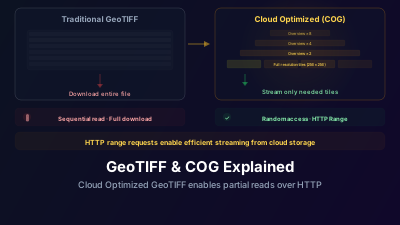
Quick Answer: A Cloud-Optimized GeoTIFF (COG) is a regular GeoTIFF with a specific internal organization: tiled layout, overviews (pyramids), and HTTP range request support. This means you can stream just the portion of the image you need over the internet without downloading the entire file. It's the reason modern satellite platforms can serve imagery interactively in a browser.
The Problem COG Solves
A single Sentinel-2 scene at full resolution is roughly 800 MB to 1 GB. If you want to view a small portion of that scene at a lower zoom level, downloading the entire file is absurd. You need maybe 0.1% of the data.
Traditional GeoTIFFs store pixels in sequential strips — row after row from top to bottom. To read a specific area, you often need to download significant portions of the file just to locate the pixels you want. Over a network, this is painfully slow.
Cloud-Optimized GeoTIFF solves this by reorganizing the internal structure so that any spatial subset can be efficiently accessed via HTTP range requests. The server sends only the bytes you need, and the client can start rendering immediately.
Inside a COG
Three properties make a GeoTIFF "cloud-optimized":
1. Tiled Layout
Instead of storing pixels in rows (strips), a COG divides the image into square tiles — typically 256×256 or 512×512 pixels. Each tile is stored contiguously in the file.
When you request a specific geographic area, the software identifies which tiles overlap that area and fetches only those tiles. No wasted bandwidth.
2. Overview Levels (Pyramids)
A COG contains pre-computed reduced-resolution versions of the image. When you're zoomed out and viewing a large area, the server delivers the appropriate overview level rather than the full-resolution data.
Typical overview levels reduce resolution by factors of 2, 4, 8, 16, and so on. Viewing a continent-wide extent might use the 64× reduced overview, requiring only a tiny fraction of the full data volume.
3. Ordered IFD (Image File Directory)
The metadata describing each tile's location in the file is placed at the beginning of the COG. This means the client can read the IFD with a single HTTP request, build an internal index of where every tile lives, and then fetch exactly the tiles it needs with targeted range requests.
In a non-optimized GeoTIFF, the IFD might be at the end of the file or scattered throughout, requiring multiple round trips just to figure out the file's structure.
Performance Difference
The practical impact is dramatic:
| Operation | Regular GeoTIFF | Cloud-Optimized GeoTIFF |
|---|---|---|
| View 1 km² area from a 10,000 km² image | Download ~1 GB, extract locally | Fetch ~200 KB of tiles |
| Pan to adjacent area | Already downloaded (if cached) | Fetch ~200 KB of new tiles |
| Zoom out to regional view | Re-process full file | Fetch overview tiles (~50 KB) |
| Initial metadata read | May require scanning large portions | Single range request (~10 KB) |
This is why platforms like Off-Nadir Delta can serve satellite imagery interactively. Tile servers read COGs from cloud storage, extract the requested tiles, and deliver them to your browser in milliseconds.
Where the Difference Actually Comes From
The decisive number is not the file size — it is how many bytes you have to move to draw one map tile.
With a traditional stripped GeoTIFF, there is no way to ask for a rectangle. To render a single 256×256 tile you effectively transfer the whole band, and the time to first render is however long that transfer takes. With a COG, the client reads the header once, works out which internal tiles overlap the request, and issues a small number of range requests for exactly those tiles. The bytes moved per rendered tile drop by orders of magnitude — from the size of the file to the size of a handful of compressed tiles — and that ratio, not raw throughput, is what makes browser-based satellite imagery visualization practical.
Compression (DEFLATE or LZW) shrinks the file on top of that, but it is the secondary effect: it reduces the size of every transfer proportionally, while the tiled layout changes how many bytes you need at all. Panning is where the two compound — a COG fetches only the newly exposed tiles, while a stripped file offers no incremental path at all.
One thing worth knowing: COG validation matters. A file that is structurally a GeoTIFF but uses strip layout instead of tile layout, or lacks internal overviews, will behave like a traditional GeoTIFF from the network perspective no matter what it is called. Always validate after creation.
Creating COGs
If you have your own GeoTIFF data and want to convert it to COG format, the standard tool is GDAL:
gdal_translate input.tif output_cog.tif \
  -of COG \
  -co COMPRESS=DEFLATE \
  -co OVERVIEW_RESAMPLING=AVERAGE \
  -co TILING_SCHEME=GoogleMapsCompatible
Key options:
- COMPRESS: DEFLATE is a safe default. LZW is also common. JPEG for lossy but smaller files
- OVERVIEW_RESAMPLING: AVERAGE for continuous data (imagery, elevation). NEAREST for categorical data (land cover classes)
- TILING_SCHEME: GoogleMapsCompatible aligns tiles to web map tile grids, which improves performance with web mapping libraries
Validating a COG
Not every file with a .tif extension that claims to be a COG actually is one. Use the rio cogeo validate command from rio-cogeo, the COG creation and validation plugin for rasterio, to check.
A properly formed COG will have:
- Tiled layout (not stripped)
- Internal overviews
- Ordered IFD at the beginning of the file
- Consistent compression across all IFDs
If you are still choosing what to open the file with, GeoTIFF viewers compared goes through the options.
STAC + COG: The Modern Stack
COG is the data format. STAC (SpatioTemporal Asset Catalog) is the discovery mechanism. Together, they form the backbone of modern satellite data infrastructure.
STAC catalogs describe what data exists — spatial extent, temporal coverage, available bands, data quality metadata. COGs provide efficient access to the actual pixel data. A client searches STAC to find relevant scenes, then streams COG tiles for visualization and analysis.
This is exactly how Off-Nadir Delta works. When you search for Sentinel-2 data over Tokyo and add it to the map, the platform queries a STAC API, receives links to COG files on cloud storage, and renders tiles on demand. No bulk downloads, no local processing, no GIS installation.
Upload Your Own COGs
If you have geospatial data in GeoTIFF format, you can upload it directly to Off-Nadir Delta. COG-formatted files will render fastest, but regular GeoTIFFs are also supported.
This is useful for overlaying your own analysis results, drone imagery, or derived products on top of the base satellite data.

Remote sensing specialist with 10+ years in satellite data processing and AI. Founder of Off-Nadir Lab. Ph.D. in Informatics (Yokohama National University, 2026). Master's in Earth System Science and Technology (Kyushu University). Co-author, Remote Sensing Encyclopedia. More about the author →