
How to Read a SAR Image: What Bright and Dark Actually Mean
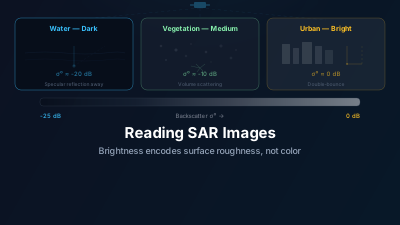
Quick Answer: In SAR images, brightness indicates how much radar energy returns to the satellite. Bright = strong backscatter (urban areas, rough surfaces, metal objects). Dark = weak return (calm water, smooth surfaces, radar shadow). Understanding these basics lets you extract meaningful information from what initially looks like a grainy gray mess.
First Impressions
Let's be honest: the first time you look at a SAR image, it looks like static on an old television. Gray, grainy, and nothing like the satellite photos you're used to seeing on Google Maps.
That's because SAR is fundamentally different from a camera. It's not capturing reflected sunlight — it's measuring how much of its own transmitted microwave energy bounces back. The brightness of each pixel tells you about the physical properties of the surface: its roughness, moisture content, geometry, and material composition.
Once you learn to read these signals, SAR images become remarkably informative.
The Brightness Rule
The single most important concept:
Bright pixels = strong radar return. Dark pixels = weak radar return.
That's it. Everything else follows from understanding what causes strong vs. weak returns.
What Makes Things Bright
Urban areas are typically the brightest features in SAR imagery. Buildings create what's called a "corner reflector" effect — radar bounces off the ground, hits a wall, and reflects straight back to the satellite. This double-bounce mechanism produces an extremely strong return.
Metal structures (ships, bridges, power lines, rooftops) are strong scatterers. A fishing vessel on calm water will appear as a brilliant white dot against a dark background — which is why ship detection is one of SAR's most reliable applications.
Rough surfaces scatter radar in all directions, and some of that energy makes it back to the sensor. Plowed agricultural fields, rocky terrain, and choppy ocean water all appear moderately bright.
What Makes Things Dark
Calm water is the quintessential dark feature. A smooth water surface acts like a mirror for radar — it reflects the energy away from the satellite (specular reflection) rather than back toward it. Rivers, lakes, and calm ocean areas appear very dark.
Smooth man-made surfaces like airport runways, parking lots, and paved roads also tend toward dark tones, though not as uniformly as water.
Radar shadow occurs behind tall objects (mountains, buildings) where the radar signal can't reach. These areas contain no data and appear black.
Patterns You'll See Repeatedly
A handful of patterns recur in almost every scene, and they are the fastest ones to learn to recognise:
Coastlines
The land-water boundary is usually sharp and obvious — textured gray (land) adjacent to smooth dark (water). This makes SAR excellent for mapping coastlines, even when optical imagery is obscured by clouds.
Agricultural Grids
Rectangular field patterns are visible in SAR, though they look different from optical imagery. Fields will vary in brightness depending on crop type, growth stage, soil moisture, and whether the field has been recently plowed.
Mountain Shadows
In mountainous terrain, slopes facing the satellite appear compressed and bright (foreshortening), while slopes facing away are stretched and may fall into shadow. This geometric distortion is a SAR-specific artifact that doesn't exist in optical data.
Urban Grids
Cities appear as bright, textured areas with a distinct pattern. Street grids can sometimes be visible, and individual large buildings may produce very bright point-like features.
VV vs. VH: Polarization Matters
Sentinel-1 typically acquires data in two polarizations: VV (vertical transmit, vertical receive) and VH (vertical transmit, horizontal receive).
The choice matters:
- VV emphasizes surface scattering. It's generally better for water/land discrimination, flood mapping, and ocean applications
- VH emphasizes volume scattering from complex structures like vegetation canopy. It's better for biomass estimation and forest monitoring
A practical rule of thumb: if you're looking at water or ice, start with VV. If you're looking at vegetation, try VH first.
Approximate Backscatter Reference
These are the approximate backscatter ranges to expect in Sentinel-1 IW GRD imagery at moderate incidence angles (~35–40°). Treat them as an orientation aid rather than thresholds — the actual values shift with incidence angle, season, and surface condition:
| Feature | VV (typical dB) | Visual Appearance |
|---|---|---|
| Calm open water / flooded field | −20 to −25 dB | Very dark (near-black) |
| Wet soil / damp grassland | −14 to −18 dB | Dark gray |
| Dry cropland / fallow field | −8 to −12 dB | Medium gray |
| Radar shadow (behind mountains) | No signal | Pure black |
| Forest canopy | −5 to −8 dB | Medium-bright gray |
| Urban fabric | −2 to +3 dB | Bright gray |
| Metal structures / ship hulls | > 0 to +10 dB | Very bright / saturated |
The total dynamic range you're working with is roughly 35 dB from the darkest water surface to the brightest metal structure. Standard display software compresses this into an 8-bit (0–255) grayscale, so the contrast stretch settings you choose dramatically affect what you see. If a scene looks uniformly dark, it's often because the display is scaled to include bright urban pixels. Manually narrowing the display range to −20 to −5 dB will bring out the detail in darker surfaces; widening to −25 to +5 dB gives you the full contrast hierarchy.
Common Misinterpretations
A few recurring pitfalls:
Confusing calm water with shadow: Both appear dark, but shadow has a geometric relationship to nearby bright features (it's always on the far side from the satellite). Calm water can appear anywhere.
Assuming bright = tall: Brightness in SAR isn't about height. A flat metal roof can be far brighter than a forested mountain. It's about surface properties, not elevation.
Ignoring look direction: SAR images acquired from different orbit directions (ascending vs. descending) can look surprisingly different for the same area, because the illumination geometry changes. Always check the orbit metadata.
Over-interpreting speckle: That grainy texture isn't detail — it's noise inherent to coherent imaging. Don't mistake bright or dark speckle pixels for real features at the single-pixel level.
Getting Started
The best way to learn SAR interpretation is to look at areas you already know. Load a Sentinel-1 scene over your hometown and try to identify features: the airport runway (dark), dense neighborhoods (bright), parks (medium gray), rivers and lakes (dark).
Compare the SAR image with an optical basemap of the same area. After a few sessions, the grainy patterns start making sense.

Remote sensing specialist with 10+ years in satellite data processing and AI. Founder of Off-Nadir Lab. Ph.D. in Informatics (Yokohama National University, 2026). Master's in Earth System Science and Technology (Kyushu University). Co-author, Remote Sensing Encyclopedia. More about the author →