
Mapping Floods with SAR: A Practical Workflow from Search to Analysis
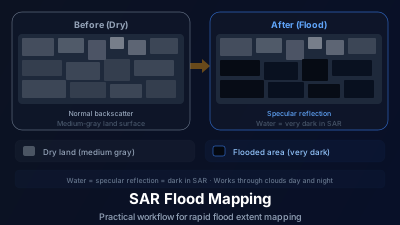
Quick Answer: SAR flood mapping works because calm floodwater produces very low radar backscatter compared to surrounding land. The workflow: find a pre-flood baseline image, acquire a post-flood image, compute the difference, and threshold to delineate flood extent. Key pitfalls include confusing radar shadow with water and missing flood extent under vegetation canopy.
Why SAR for Floods
Floods happen during storms. Storms bring clouds. This creates a fundamental conflict for optical satellite monitoring — you can't see the flood because the weather that caused it is blocking the view.
SAR doesn't have this problem. Sentinel-1's C-band radar penetrates clouds and works at night, providing flood observations when they're most needed: during and immediately after the event.
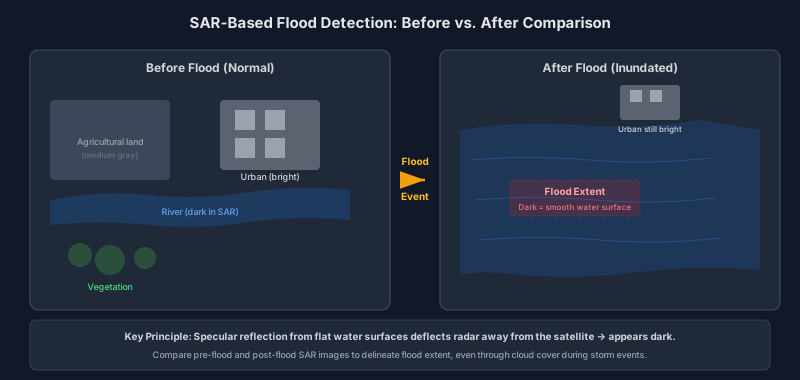
The detection principle is straightforward. Calm floodwater acts like a mirror for radar — it reflects the microwave energy away from the satellite rather than back toward it. In the SAR image, flooded areas appear very dark against the relatively bright surrounding land.
The Workflow
Step 1: Acquire a Pre-Flood Baseline
Before you can identify what's flooded, you need to know what "normal" looks like. Search for a dry-season Sentinel-1 image from the same area, ideally acquired from the same orbit track (ascending or descending) to minimize incidence angle differences.
Timing guidelines for the baseline:
- Ideal: Same season, previous year, same orbit direction
- Acceptable: Within the past 3-6 months if conditions were dry
- Avoid: Different season (winter vs. summer), different orbit direction, or images acquired during prior flood events
Why orbit direction matters: ascending and descending passes have different look angles, which changes the backscatter values. Comparing an ascending pre-flood image with a descending post-flood image introduces systematic differences that contaminate your flood signal.
Step 2: Acquire the Post-Flood Image
Search for Sentinel-1 data covering your area of interest during or immediately after the flood event. With a 6-day revisit cycle, there's usually an acquisition within a few days of any significant flood.
Check the acquisition date relative to the flood timeline. Floodwater can recede quickly — an image from 5 days after peak flooding may show significantly less inundation than one from day 1.
Step 3: Visual Comparison
Before any quantitative analysis, simply toggle between the pre-flood and post-flood images. Areas that changed from medium gray (land) to very dark (water) are your flood candidates.
This visual check serves as a sanity test. If large areas changed, you probably have a real flood signal. If changes are subtle or scattered, you may need to reconsider your image selection or check for other confounding factors.
Step 4: Backscatter Thresholding
The simplest quantitative approach:
- Compute the difference: ΔσdB = σ⁰_post - σ⁰_pre (in decibels)
- Apply a threshold: pixels where ΔσdB drops below a chosen value (typically -3 to -5 dB) are classified as flooded
The threshold value isn't universal — it depends on the land cover, incidence angle, and local conditions. Start with -3 dB and adjust based on visual validation:
- Too many pixels classified? Tighten to -4 or -5 dB
- Missing obvious flood areas? Relax to -2 dB
Step 5: Validation and Cleanup
No flood map is perfect from a single threshold operation. Post-processing steps:
- Remove isolated pixels: True flood areas are spatially contiguous. Scattered individual pixels are likely noise
- Check against elevation data: Water flows downhill. Flood pixels at high elevation relative to nearby terrain are suspicious
- Mask permanent water bodies: Rivers and lakes will appear dark in both images and shouldn't be classified as "new" flooding
Common Pitfalls
Radar Shadow vs. Water
In mountainous terrain, slopes facing away from the satellite can fall into radar shadow — appearing black in the SAR image, just like water. If you're working near mountains, be especially careful. Shadow always appears on the far side of elevated terrain relative to the satellite's look direction.
Wind-Roughened Floodwater
The "dark water" assumption depends on the water surface being calm. Wind-roughened floodwater produces more backscatter and may not contrast as strongly against surrounding land. During active storms, this can cause underestimation of flood extent.
Double-Bounce in Flooded Vegetation
When floodwater reaches into forested areas or urban zones, something counterintuitive happens. The radar signal bounces off the water surface, hits a tree trunk or building wall, and reflects back to the satellite. This "double-bounce" creates anomalously bright returns — the flooded area appears brighter than normal, not darker.
This effect is well-documented in flooded forests and is actually a useful signal for detecting under-canopy inundation. But if you're only looking for dark pixels, you'll miss it entirely.
Soil Moisture Confusion
Wet soil (but not flooded) also shows reduced backscatter compared to dry soil. After heavy rain, agricultural fields may appear darker than in the pre-flood baseline without being actually inundated. This is a real source of false positives in agricultural areas.
When to Use C-Band vs. L-Band
Sentinel-1's C-band (5.6 cm wavelength) is excellent for open-water flood detection. The short wavelength interacts primarily with the top of the vegetation canopy, so it doesn't "see" flooding underneath dense vegetation.
L-band systems like NISAR (~24 cm wavelength) penetrate deeper into vegetation, making them better for detecting flooding in forested areas through the double-bounce mechanism described above.
For most flood mapping tasks, C-band is sufficient. If your area of interest includes significant forest cover, L-band data — when available — provides crucial complementary information.
Backscatter Numbers to Calibrate Against
Thresholding works better once you have an intuitive feel for the numbers involved. For Sentinel-1 IW GRD over flat terrain at a typical incidence angle of 35–40°:
| Condition | VV Backscatter (typical) |
|---|---|
| Calm open floodwater | −20 to −25 dB |
| Wet soil after heavy rain | −14 to −18 dB |
| Dry cropland or grassland | −8 to −12 dB |
| Flooded vegetation (double-bounce) | −2 to +3 dB |
A backscatter drop of −3 to −5 dB between the dry baseline and the post-flood image is a reliable starting threshold for open-area flood detection. If you see too many false positives in agricultural areas (wet but not flooded fields triggering the threshold), tighten to −6 dB. If you are mapping flooding in an area with residual surface moisture in the baseline, −2 dB may be necessary to avoid under-mapping.
A timing observation: the image closest to peak inundation shows the clearest open-water signal, and each pass after that captures a progressively drained landscape. Well-drained agricultural land can shed surface water within days, so a scene acquired several passes later will under-map the true peak extent. Low-lying and poorly drained areas — backswamps, forested floodplains, clay soils — hold water far longer, so the same scene may still show them inundated. The time elapsed since peak flooding matters as much as the threshold you choose, and a single post-event scene should always be labelled with how long after the peak it was acquired.
The practical consequence: if you have the choice between a 12-hour-old image and a 72-hour-old image, use the first for total extent mapping and the second (alongside the first) to estimate which areas are already drying out.
Quick Reference
| Scenario | Appears in SAR | Method |
|---|---|---|
| Open water flooding | Very dark | Threshold backscatter decrease |
| Flooded urban area | Anomalously bright | Look for backscatter increase |
| Flooded forest | Bright (double-bounce) | L-band preferred |
| Wet soil (not flooded) | Slightly darker | Can cause false positives |
| Permanent water body | Dark in both dates | Mask before analysis |
To get started, load Sentinel-1 SAR data for an area affected by a recent flood event. Compare a pre-flood and post-flood scene visually and look for the dark-water signature. Learn more about SAR-based flood mapping approaches.

Remote sensing specialist with 10+ years in satellite data processing and AI. Founder of Off-Nadir Lab. Ph.D. in Informatics (Yokohama National University, 2026). Master's in Earth System Science and Technology (Kyushu University). Co-author, Remote Sensing Encyclopedia. More about the author →