
Atmospheric Correction of Satellite Imagery: Why It Matters and How It Works
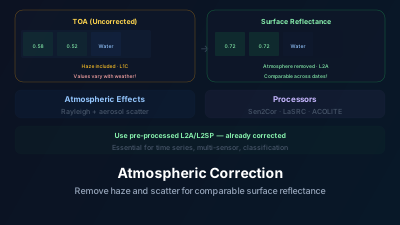
Quick Answer: The atmosphere scatters and absorbs light between the sun, the ground, and the satellite sensor. Without correction, satellite measurements include atmospheric contamination that varies with viewing geometry, atmospheric conditions, and wavelength. Atmospheric correction converts top-of-atmosphere (TOA) radiance to surface reflectance — the physical property of the ground surface. This is essential for: multi-temporal analysis (comparing images from different dates), multi-sensor analysis (comparing Sentinel-2 with Landsat), and quantitative applications (vegetation indices, classification). Standard processors: Sen2Cor (Sentinel-2), LaSRC (Landsat), ACOLITE (water applications). Level-2A products from Copernicus and USGS are already atmospherically corrected, so most users never need to run correction themselves.
Here's a situation that catches many beginners: you calculate NDVI from two Sentinel-2 images of the same field — one from a clear day and one from a hazy day. The NDVI values differ by 0.10-0.15, even though the crop hasn't changed. The difference isn't in the vegetation — it's in the atmosphere between the vegetation and the satellite.
This is why atmospheric correction exists: to remove the atmosphere's influence from satellite measurements so you're analyzing the ground, not the air above it.
What the Atmosphere Does to Light
Scattering
Atmospheric molecules and aerosols scatter incoming sunlight and reflected surface light:
Rayleigh scattering: Molecular scattering that is strongest at short wavelengths (blue light scattered ~16× more than red). This is why the sky is blue — and why uncorrected satellite imagery has a blue-ish haze, especially in the blue band.
Aerosol (Mie) scattering: Particles (dust, smoke, pollution) scatter light across all visible wavelengths. Highly variable in space and time — a dust storm or wildfire smoke can dramatically change the atmospheric signal.
Path radiance: Light scattered into the sensor's field of view without ever reaching the ground surface. This additive signal reduces contrast and inflates apparent surface brightness, particularly in dark surfaces (water, shadows).
Absorption
Atmospheric gases absorb light at specific wavelengths:
- Water vapor: Strong absorption in SWIR (around 1400nm, 1900nm)
- Ozone: Absorption in UV and visible
- Oxygen: Absorption near 760nm (the O₂-A band)
- CO₂: Absorption in SWIR
Absorption reduces the total light reaching the sensor, creating wavelength-dependent signal loss.
The Combined Effect
At the satellite sensor, the measured signal is:
L_sensor = L_path + T × ρ_surface × E_sun / π
Where:
- L_path: Path radiance (atmospheric scattering into the sensor — unwanted)
- T: Atmospheric transmittance (reduction due to absorption and scattering)
- ρ_surface: Surface reflectance (what you actually want to measure)
- E_sun: Solar irradiance at the surface (reduced by atmosphere)
Atmospheric correction solves for ρ_surface by estimating and removing L_path and T.
Processing Levels
Level-1 (Top-of-Atmosphere)
What the sensor actually measures:
- L1C (Sentinel-2): TOA reflectance — radiometrically calibrated and geometrically corrected, but no atmospheric correction
- L1 (Landsat): TOA radiance or reflectance
L1 products include atmospheric effects. NDVI computed from L1 data varies with atmospheric conditions, not just surface conditions.
Level-2 (Surface Reflectance)
Atmospherically corrected:
- L2A (Sentinel-2): Surface reflectance processed by Sen2Cor
- L2SP (Landsat): Surface reflectance processed by LaSRC
L2 products represent the physical reflectance of the ground surface. NDVI from L2 data is comparable across dates and sensors (within calibration uncertainty).
Atmospheric Correction Algorithms
Sen2Cor (Sentinel-2)
ESA's official processor for Sentinel-2 atmospheric correction:
- Estimates aerosol optical depth from dense dark vegetation pixels and the 940nm water vapor band
- Uses radiative transfer lookup tables to compute atmospheric contribution
- Produces L2A surface reflectance and a Scene Classification Map (cloud, shadow, snow, vegetation, etc.)
- Available through ESA's Copernicus Data Space (L2A products pre-generated)
LaSRC (Landsat Surface Reflectance Code)
USGS's processor for Landsat 8/9:
- Uses auxiliary atmospheric data (MODIS aerosol, ozone, water vapor)
- Radiative transfer-based correction
- Produces Collection 2 Level-2 surface reflectance products
ACOLITE
Specialized for aquatic applications:
- Optimized for dark water targets where standard algorithms may fail
- Handles sun glint and adjacency effects from nearby bright land
- Supports Sentinel-2, Landsat, and several other sensors
6S (Second Simulation of the Satellite Signal in the Solar Spectrum)
A general-purpose radiative transfer code:
- Computes atmospheric correction coefficients for any sensor
- Requires atmospheric parameter inputs (aerosol type and loading, water vapor, ozone)
- Used as the backend for many operational processors
When Atmospheric Correction Matters Most
Multi-Temporal Analysis
Comparing images from different dates — the most common analysis type:
- Without correction: Apparent NDVI changes include atmospheric variation (~0.05-0.15 NDVI units on hazy vs. clear days)
- With correction: NDVI changes reflect actual surface changes (vegetation growth, harvest, stress)
For change detection, atmospheric correction is essential. Without it, you're detecting atmospheric changes, not surface changes.
Multi-Sensor Comparison
Comparing Sentinel-2 with Landsat data:
- Different spectral response functions
- Different viewing geometries
- Without correction to a common physical quantity (surface reflectance), direct comparison is invalid
Quantitative Retrievals
Any application that uses reflectance values quantitatively:
- Chlorophyll estimation from water reflectance
- Soil organic matter estimation from SWIR reflectance
- Biomass estimation from NDVI magnitude
- Albedo estimation for energy balance
Classification
Machine learning classifiers trained on surface reflectance from one image should generalize to other images:
- Trained on TOA data: Classifier learns atmospheric conditions specific to the training image, may not transfer
- Trained on surface reflectance: Classifier learns surface properties, transfers better across dates and locations
When You Can Skip It
Single-Image Visual Interpretation
If you're only visually interpreting one image (manual mapping, visual change comparison), atmospheric effects are usually minor enough not to affect interpretation.
Relative Indices Within a Single Image
NDVI computed within a single image for relative comparison (this field vs. that field on the same date) is minimally affected by atmosphere because the atmospheric effect is approximately spatially uniform. The relative ranking of NDVI values is preserved.
Thermal Analysis
Thermal atmospheric correction is a separate process from optical correction and is handled differently. Thermal bands have different atmospheric interactions (primarily water vapor absorption and emission).
Practical Recommendations
Use pre-processed L2 products: Copernicus provides Sentinel-2 L2A globally. USGS provides Landsat Collection 2 L2. These are atmospherically corrected using standard algorithms. For most applications, these products are sufficient and save you from running correction yourself.
Check the quality flags: L2 products include quality bands (cloud mask, aerosol quality, processing confidence). Use these to filter out poorly corrected pixels.
Be cautious in challenging conditions: Atmospheric correction accuracy degrades over:
- Bright surfaces (desert, snow) where the surface/atmosphere signal ratio is different
- Water bodies where the dark surface amplifies relative atmospheric contribution
- High aerosol loading (near fires, dust storms) where the atmospheric model may be inadequate
- Mountainous terrain where elevation and slope affect atmospheric path length
Validate when precision matters: If your application requires reflectance accuracy better than ~0.01-0.02, validate the L2 product against ground spectral measurements or at least check for spatial artifacts and temporal consistency.
Atmospheric correction is the unglamorous but essential preprocessing step that makes quantitative satellite remote sensing possible. The fact that most users never need to think about it — because data providers deliver pre-corrected L2 products — is a testament to how mature and operational the processing chain has become. But understanding what atmospheric correction does, and when it matters, helps you avoid the subtle errors that arise when atmospheric effects contaminate your analysis.
