
How to Connect an Event-Intelligence MCP Server to Claude, ChatGPT, Cursor, and the Command Line
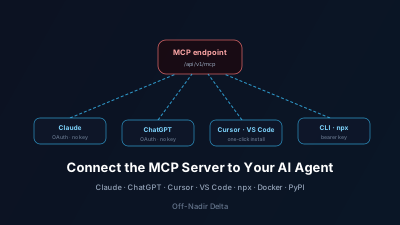
Quick Answer: The Off-Nadir Delta MCP server gives an AI agent live, geolocated world-event intelligence, and there are now four ways to connect it. Chat apps (Claude and ChatGPT) add it as a remote connector over OAuth 2.1 — paste one URL, approve, no API key to copy. Editors (Cursor and VS Code) install it from a one-click deeplink. Command-line clients like Claude Code add it in one line pointing at the Streamable HTTP endpoint with a bearer key. Local setups run it over stdio via `npx -y offnadir-delta-mcp` or Docker, published on npm; a Python SDK (`offnadir-delta`) is on PyPI, and the server is listed in the official MCP Registry as `com.offnadir-delta/mcp`. Every tool is available on every plan including Free — the only gate is your token balance, and get_world_brief and get_usage cost zero tokens.
An AI agent's knowledge stops at its training cutoff, so it cannot tell you what happened in the world this morning. The Off-Nadir Delta MCP server fixes that by giving the agent live, geolocated world-event intelligence on demand — and it is now reachable through four different connection methods, from a one-click OAuth approval in a chat app to a single command line. This guide shows each one and when to use it.
What is the Off-Nadir Delta MCP server?
It is a Model Context Protocol (MCP) server that exposes live world-event intelligence to AI agents as callable tools. Over one endpoint an agent can query geolocated event signals, see what changed about the events in an area, search satellite imagery over an event, read the AI-synthesized Daily World Brief, and ask an OSINT/GEOINT analyst — grounded in sourced, geolocated signals rather than a static training snapshot. The Model Context Protocol is an open standard for connecting AI applications to external tools and data; see the MCP specification for the protocol itself.
The server ships a set of tools and readable resources, and the roster grows as capabilities are added — the MCP docs list what is live right now. Every tool is available on every plan, including Free: the only gate is your token balance, and several tools cost nothing to call.
Which connection method should you use?
Pick the method that matches how you run your agent. All four reach the same intelligence and the same token balance underneath.
| Where your agent runs | Method | Auth | Best for |
|---|---|---|---|
| Claude app / ChatGPT | Remote connector (OAuth 2.1) | Approve in-app, no key to copy | Chatting with situational awareness |
| Cursor / VS Code | One-click install deeplink | OAuth or bearer key on first use | Coding agents in an editor |
| Claude Code / any CLI | claude mcp add (Streamable HTTP) | Bearer API key | Terminal and scripted agents |
| Local / self-hosted | npx or Docker (stdio) | Bearer API key via env | Clients that prefer a local process |
How do you add it to Claude or ChatGPT?
Add it as a remote connector — no API key to paste. In claude.ai or ChatGPT (Developer Mode), open Settings → Connectors → Add custom connector and enter the endpoint:
https://offnadir-delta.com/api/v1/mcp
The chat app then walks you through an OAuth approval and the tools appear in your conversation. The server implements OAuth 2.1 with PKCE and Dynamic Client Registration, the authorization pattern the MCP authorization specification defines for interactive clients, so the app registers itself and you simply approve access. Custom-connector limits differ by Claude plan, and ChatGPT's Developer Mode is not exposed on every plan — check yours. The connection is metered on your token balance and revocable anytime. Step-by-step screens are in the MCP setup docs.
How do you install it in Cursor or VS Code?
Use the one-click install buttons on the MCP page. Cursor installs the server from an anysphere.cursor-deeplink install link; VS Code installs it from a vscode:mcp/install link with the HTTP transport pre-filled. You complete OAuth — or paste your ond_… API key — on first use. This is the fastest path for a coding agent that already lives in your editor.
How do you connect it from the command line?
For Claude Code or any MCP client that speaks HTTP, add the server in one line with your API key as a bearer header:
claude mcp add --transport http off-nadir-delta \
  https://offnadir-delta.com/api/v1/mcp \
  --header "Authorization: Bearer ond_..."
Issue a key first from Account → Developer API; keys are shown once and revocable anytime. Any client that supports HTTP transports works the same way — point it at /api/v1/mcp and pass the Authorization header.
How do you run it locally with npx or Docker?
If your client prefers a local stdio server over a remote connector, run the published package. It is a thin local server that forwards calls to the hosted endpoint with your key:
{
  "mcpServers": {
    "off-nadir-delta": {
      "command": "npx",
      "args": ["-y", "offnadir-delta-mcp"],
      "env": { "OFFNADIR_DELTA_API_KEY": "ond_your_key_here" }
    }
  }
}
The package is on npm as offnadir-delta-mcp, and a Dockerfile is included for containerized setups (docker run --rm -i -e OFFNADIR_DELTA_API_KEY offnadir-delta-mcp). Tool discovery works without credentials, so a registry or client can inspect the server before you add a key; only metered tool calls need the key.
Is there a Python SDK?
Yes. The official Python client is on PyPI as offnadir-delta and installs with pip install offnadir-delta. It queries the same event signals and satellite imagery from Python with both synchronous and asynchronous interfaces — useful when you are wiring the intelligence into your own code rather than an agent. The server is also listed in the official MCP Registry as com.offnadir-delta/mcp, which is the machine-readable index that MCP clients and directories read from.
Which tools and resources are available?
The core tools are below. Some are free to call, so an agent can orient itself before spending anything. This is not the full roster — it has grown since this article was written, and the MCP docs carry the current list:
| Tool | Cost | What it does |
|---|---|---|
get_world_brief | Free (0 tokens) | Read the AI-synthesized Daily World Brief |
get_usage | Free (0 tokens) | Check remaining token balance and plan capabilities |
query_signals | Metered | Geolocated event signals by area, date, and category |
search_imagery | Metered | Satellite scenes (Sentinel-1/2) over an area |
assess_signal | Metered | AI remote-sensing assessment for one event |
ask_analyst | Metered | Agentic OSINT/GEOINT Q&A returning a structured, cited brief |
It also ships resources the agent can read directly, among them brief://latest, the templated brief://{date}, signals://schema, and usage://current. For the tool ergonomics behind these, see How to Give an AI Agent Live World-Event Awareness.
How do you verify it is working?
Start with a free call so it costs nothing. Once the server is connected, ask your agent to read the latest Daily World Brief — that invokes get_world_brief, which draws zero tokens. A good first prompt: "Using the Off-Nadir Delta connector, read the latest Daily World Brief, then list the five highest-severity world-event signals from the last 24 hours, each with its coordinates, category, and a source link." The first step is free; the second (query_signals) draws from your balance. Check your balance any time with get_usage, also free. If you are new to the underlying concepts, the glossary defines the event-intelligence terms these tools return.
Where to go next
- Connect it now: the MCP setup docs have the per-app screens and config blocks.
- See the tool surface: the MCP page lists every tool and resource with copyable demo prompts.
- Build a workflow: From a World Event to the Satellite Scenes Over It chains the tools end to end.
- Try the analyst: Delta Agent is the in-app version of the same analysis the tools expose.
Off-Nadir Delta is an independent project by Kazushi Motomura. Reading the Daily World Brief and checking usage are free; queries, assessments, and analyst calls are metered on your token balance, with a Free tier included — so you stay in control of what an agent can spend.

Remote sensing specialist with 10+ years in satellite data processing and AI. Founder of Off-Nadir Lab. Ph.D. in Informatics (Yokohama National University, 2026). Master's in Earth System Science and Technology (Kyushu University). Co-author, Remote Sensing Encyclopedia. More about the author →