
Google Earth Engine for Satellite Analysis: Power and Limitations
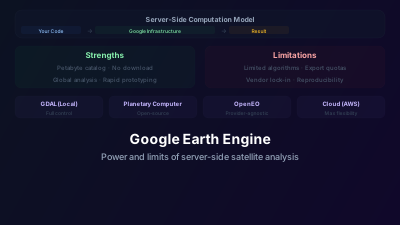
Quick Answer: Google Earth Engine (GEE) provides free access to petabytes of satellite imagery (Landsat, Sentinel, MODIS, and hundreds more) with server-side computation — your analysis code runs on Google's infrastructure, not your computer. This eliminates data download and local processing bottlenecks. GEE excels at large-area, multi-temporal analysis (continental/global studies, long time series). Limitations: the JavaScript/Python API has a learning curve, custom algorithm flexibility is restricted by GEE's functional programming model, export quotas limit large-scale output, and dependency on Google's continued free access creates sustainability concerns for operational systems.
Before Google Earth Engine, analyzing 30 years of Landsat data for an entire country meant downloading terabytes of imagery, managing storage, and processing for days or weeks on local hardware. GEE made the same analysis possible in minutes — not because the computation was faster, but because the data was already there, pre-indexed and ready for server-side processing.
This paradigm shift — bringing computation to the data rather than data to the computation — has democratized large-scale Earth observation analysis. But it comes with trade-offs that every user should understand.
How GEE Works
The Data Catalog
GEE hosts a multi-petabyte catalog of Earth observation data:
- Landsat: Complete archive (1972-present), all processing levels
- Sentinel-1/2/3/5P: Full Copernicus archive
- MODIS: Complete archive of all products
- Climate data: ERA5, CHIRPS precipitation, temperature datasets
- Terrain: SRTM, ALOS World 3D
- Land cover: ESA WorldCover, Dynamic World, MODIS land cover
- Hundreds more: Commercial datasets, derived products, vector datasets
All data is analysis-ready — atmospherically corrected, geometrically registered, and indexed for efficient spatial/temporal queries.
Server-Side Computation
When you write GEE code (JavaScript in the Code Editor, or Python via the ee library), your code defines a computation graph. This graph is sent to Google's servers, which:
- Identify which data tiles are needed
- Execute the computation in parallel across many machines
- Return only the result (a map visualization, a statistic, an exported file)
You never download the raw input data. The computation happens where the data lives.
Lazy Evaluation
GEE uses lazy evaluation — computations aren't executed until results are requested (by displaying on a map, printing a value, or exporting). This enables GEE to optimize the execution plan: if you request a small region, only tiles covering that region are processed, even if your code nominally operates on a global dataset.
Where GEE Excels
Large-Area Multi-Temporal Analysis
GEE's sweet spot: studies that require processing many images across large areas and long time periods.
Example: Computing annual median NDVI for all of Africa from 2015-2024 using Sentinel-2. That is a continent-scale stack of hundreds of thousands of scenes. On GEE, it's a few dozen lines of code. Done locally, the download alone would run to tens of terabytes before any processing started — which is the point: the bottleneck was never the arithmetic, it was moving the pixels.
Rapid Prototyping
The Code Editor provides immediate visual feedback:
- Write a line of code → see the result on the map instantly
- Iterate quickly through band combinations, thresholds, and classification approaches
- Share scripts with collaborators via URL
Education and Accessibility
GEE has been transformative for education and developing-country researchers:
- No hardware requirements beyond a web browser
- No software installation
- Free access (for research and education)
- Extensive tutorials and documentation
Global Products
Many influential global datasets were produced using GEE:
- Global Forest Change (Hansen): Annual forest loss/gain since 2000
- Dynamic World: Near-real-time global land cover at 10m
- Global Surface Water (Pekel): multi-decadal global surface water history from the Landsat archive
Where GEE Has Limitations
Algorithm Flexibility
GEE's functional programming model constrains what you can implement:
- No pixel-by-pixel iteration: You can't write traditional for-loops over pixels. Everything must be expressed as operations on Images and ImageCollections.
- Limited custom ML: While GEE has built-in classifiers (Random Forest, SVM, CART), implementing custom deep learning architectures isn't practical.
- Memory constraints: Server-side computation has memory limits per tile. Complex per-pixel operations on many bands can exceed these limits.
Export and Output Limitations
Getting large results out of GEE can be frustrating:
- Export tasks run asynchronously and can queue for hours
- Maximum export size and concurrent task limits
- Results go to Google Drive or Cloud Storage (additional transfer step)
- For operational systems that need to serve tiles or products to users, GEE's export pipeline isn't designed for real-time delivery
Dependency and Sustainability
Relying on GEE for operational systems raises concerns:
- Google controls access and pricing (currently free for research, paid for commercial)
- API changes can break existing code
- No SLA (Service Level Agreement) for the free tier
- Data availability depends on Google's curation decisions
Reproducibility
GEE code depends on Google's data catalog versioning:
- Dataset processing versions change over time
- Code that worked last year may produce different results this year if the underlying data was reprocessed
- Pinning specific data versions is possible but not always straightforward
GEE vs. Alternatives
Local Processing (GDAL, Python, R)
Advantages over GEE: Full algorithm flexibility, no dependency on external service, complete control over processing, reproducible environments.
Disadvantages: Requires data download, local storage, and compute resources. Impractical for very large analyses.
Cloud-Native Processing (on AWS/Azure/GCP)
Advantages over GEE: Full flexibility (run any code, any library), scalable compute, no vendor lock-in to GEE specifically.
Disadvantages: Requires more infrastructure knowledge, data access costs (egress), and setup effort.
Microsoft Planetary Computer
Similar concept to GEE but based on open-source tools (STAC, xarray, Dask):
- Hosts similar datasets to GEE
- Uses standard Python scientific computing stack
- JupyterHub-based interface
- More flexible for custom analysis
OpenEO
An open API standard for server-side Earth observation processing:
- Provider-agnostic (works with multiple backends)
- Standard process definitions
- Avoids vendor lock-in
- Still maturing compared to GEE's ecosystem
Platform Comparison: When to Choose What
Understanding the practical differences between GEE and its alternatives prevents choosing the wrong tool for the job:
| Capability | GEE | Microsoft Planetary Computer | Local / HPC | AWS/GCP Cloud |
|---|---|---|---|---|
| Data access cost | Free (Landsat, Sentinel, MODIS) | Free (similar catalog) | Download required (free data but egress cost) | Storage + egress costs |
| Time to first result (new user) | Minutes (Code Editor) | Hours (Jupyter setup) | Days (environment + download) | Days (infrastructure) |
| Max area per analysis | Continental/global | Continental/global | Limited by local compute | Unlimited (cost scales) |
| Custom ML / deep learning | Limited (built-in only) | Full flexibility (PyTorch, TF) | Full flexibility | Full flexibility |
| Algorithm transparency | Code visible; data not pinned | Full transparency | Full transparency | Full transparency |
| Reproducibility risk | Medium (Google controls data) | Medium | Low | Low |
| Operational system use | Not recommended (no SLA) | Acceptable with caveats | Good | Recommended |
| Learning curve | Medium (GEE API idioms) | Medium (STAC + xarray) | High (data management) | High (infrastructure) |
Scale where GEE has no practical alternative: global annual composites and multi-decadal, whole-archive time series. At that scale the advantage is not raw compute — it is that the archive is already ingested, pre-indexed, and sitting next to the processors. A rival deployment has to solve the data-locality problem before it can even start competing on compute, which is why datasets like Global Forest Change (annual global Landsat analysis since 2000) were built on this architecture rather than on a generic cloud.
The vendor lock-in tradeoff: what GEE's free research tier actually provides is a multi-petabyte catalog plus the compute to traverse it, at no cost to the user. Reproducing that on rented infrastructure means paying for storage, ingest, and compute yourself, which is exactly the barrier that stopped this kind of analysis before GEE existed. For individual researchers and universities the free access is transformative. For commercial operations the dependency risk is real: commercial use is a separate paid tier, its pricing is set unilaterally by Google, and it has changed before.
Practical Recommendations
Use GEE for: Exploratory analysis, global/continental studies, education, rapid prototyping, time series analysis over large areas.
Use local/cloud processing for: Operational systems, custom ML/deep learning, analyses requiring full algorithmic control, systems where reproducibility and independence from external services are critical.
Hybrid approach: Many practitioners use GEE for initial exploration and large-area screening, then process final results locally or on cloud infrastructure where they have full control.
GEE has been enormously valuable for the Earth observation community — it made planetary-scale analysis accessible to researchers who previously couldn't afford the compute and storage. But understanding its limitations is as important as appreciating its capabilities, particularly for anyone building systems that need to operate reliably over years without depending on a single company's goodwill.

Remote sensing specialist with 10+ years in satellite data processing and AI. Founder of Off-Nadir Lab. Ph.D. in Informatics (Yokohama National University, 2026). Master's in Earth System Science and Technology (Kyushu University). Co-author, Remote Sensing Encyclopedia. More about the author →